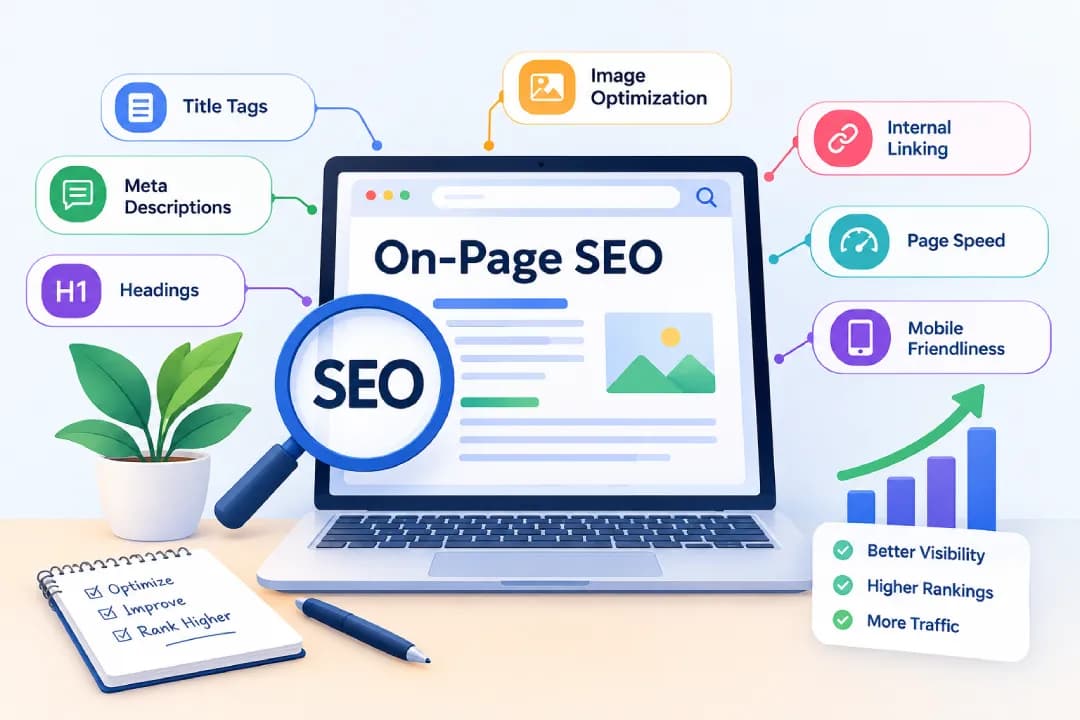
On-page SEO (also called on-site SEO or on page optimization) is the practice of optimizing the content, HTML elements, and structure of an individual web page so search engines understand it and rank it higher for relevant searches. It covers things you control directly on the page: title tags, meta descriptions, headings, URLs, content, images, internal links, and page experience. Done well, it helps the right people find your page and gives them what they came for.
This guide covers the definition, the core factors, a step-by-step checklist, advanced techniques, platform-specific tips, and tools. Whether you're learning the basics or refining an existing site, you can work through it in order or jump to the section you need.
Table of contents11 sections
What Is On-Page SEO? Definition, Benefits, and Basics
On-Page SEO Explained in Simple Terms
On-page SEO is an important part of **search engine optimization** (SEO), which helps improve a website’s visibility in organic search results. Think of a search engine as a librarian. When someone asks a question, the librarian looks for the book that best answers it. On-page SEO is how you label your book clearly: a good title, a useful summary, organized chapters, and content that actually delivers.
Search engines read your page's source code and visible content to work out its topic. The clearer those signals are, the easier it is for Google, and increasingly AI search engines, to match your page with the right query.
What On-Page SEO Includes: Content, HTML Elements, and Site Structure
The elements of on-page SEO fall into three groups.
Content covers the text, images, and video on the page, along with how well they match what people are searching for. HTML elements include the title tag, meta description, header tags, image alt text, and structured data. Site structure covers URLs, internal links, navigation, and how pages relate to one another.
Together, these are the on-page SEO factors most professionals check first during an audit.
Why On-Page SEO Matters for Search Engine Rankings
You can publish excellent content and still stay invisible if search engines can't interpret it. On-page SEO closes that gap. It improves relevance, which helps with rankings, and it improves user experience, which keeps visitors on the page longer.
Another benefit is that you own every part of it. You can't control who links to you, but you can rewrite a title tag this afternoon. That makes it the most practical starting point for improving organic traffic.
On-Page SEO vs. Off-Page SEO vs. Technical SEO
People often ask about on off page SEO as if they were rivals. They're not. They're three parts of the same system.
What Is Off-Page SEO?
Off-page SEO covers signals that happen away from your website. The biggest one is backlinks from other sites, but brand mentions, reviews, and social visibility also count. Resources like Moz off page SEO guides describe it as building reputation and authority.
What Is Technical SEO?
Technical SEO deals with how well search engines can crawl, render, and index your site. Search engines discover website pages through crawling, which helps them find and process your content. Think site speed, XML sitemaps, HTTPS, and fixing broken pages. Some overlap exists with on-page work, which is why you'll hear the term technical on-page SEO for things like structured data and Core Web Vitals.
Three technical ideas affect on-page results more than most people expect.
First, crawlability and indexing are not the same. A page can be reachable by Google and still be kept out of the index by a no index meta robots tag, a blocked resource, or a canonical tag pointing to a different URL. A canonical tag tells Google which version of a duplicate or near-duplicate page you prefer. If the canonical points to the wrong page, your carefully optimized content may never appear in results.
Second, rendering matters. If your main text, headings, or links are added by JavaScript after the page loads, Google has to render the page to see them. That usually works, but it can be delayed or incomplete. Compare the raw source HTML with the rendered HTML, and keep your key content visible in both.
Third, a no index tag is a deliberate choice, not a mistake, on pages like internal search results or thank-you pages. The problem only starts when it lands on pages you want to rank.
Key Differences and How They Work Together
On-page SEO is what you say and how you present it. Off-page SEO is what others say about you. Technical SEO is whether search engines can access it all. If one is weak, the others struggle. Great content on a site that can't be indexed won't rank, and a technically perfect site with thin content won't either.
How to Do Keyword Research and Understand Search Intent
What Is Keyword Research and How Does It Work?
Keyword research is the process of finding the words and phrases people type into search engines, then choosing the ones worth targeting. You start with a broad topic, expand it with a tool, and check search volume, difficulty, and relevance.
Free options include Google's autocomplete and "People also ask" boxes. Paid tools like Ahrefs and Semrush add data on competition and traffic potential.
What Is Search Intent and Why Does It Matter?
Search intent is the reason behind a query. There are four common types.
Informational searches look for answers, like "what is on page SEO." Navigational searches aim for a specific site or brand. Commercial searches compare options before a decision, like "best running shoes." Transactional searches show readiness to act, such as "buy running shoes online" or "on-page SEO services pricing."
Matching intent matters because Google tries to show pages that satisfy the searcher. If your page offers a sales pitch when people want a guide, it will struggle regardless of how well it's optimized. Some queries carry mixed intent, which is why the results page sometimes shows guides, products, and videos side by side.
How to Choose the Right Primary and Secondary Keywords
Pick one primary keyword that describes the page's main topic. Then add secondary keywords, which are related terms, variations, and questions that support it.
For this article, the primary keyword is "on-page SEO," while terms like "title tag," "meta description," and "internal linking" are supporting ones. Choose terms you can realistically rank for. A new site is better off targeting a specific phrase than a highly competitive head term.
Once you have several pages, build a simple keyword map. It's a spreadsheet with one row per URL, showing the primary keyword, the search intent, and the page type. Before writing anything new, check the map. If another page already targets the same keyword with the same intent, update that page instead. Two similar pages competing for one query is called keyword cannibalization, and it usually splits your results rather than doubling them.
How to Match Content to Search Intent
Search the keyword yourself and study the first page of results. Are they guides, product pages, videos, or lists? Notice the format, depth, and angle. Also look at the SERP features, such as featured snippets, "People also ask" boxes, image packs, and video results. They show what Google believes searchers want.
Next, look for gaps. Open the top few pages and note which subtopics they skip, which questions they leave unanswered, and where the advice feels dated. Build your page to serve the same need, only better, with clearer steps, fresher examples, or more practical detail.
Page type matters too. A category page needs clear product groupings and helpful filtering text. A product page needs specifications, pricing, and reviews. A landing page needs one focused message and a clear next step. An informational article needs depth and clear explanations. Using the wrong type for the intent is a common reason well-written pages fail to rank.
Core On-Page SEO Ranking Factors
Title Tags
The title tag is the clickable headline in search results. Keep it under about 60 characters so it doesn't get cut off, put the main keyword near the front, and make it read like something a person would want to click. Every page needs a unique one.
What Is a Meta Description?
A meta description is the short summary displayed under the title in search results. It doesn't directly influence rankings, but it affects whether people click. Aim for roughly 150 to 160 characters, mention the benefit, and include the keyword naturally. Google sometimes rewrites it, which is fine.
Header Tags (H1–H4) and Content Hierarchy
Use one H1 for the page's main topic, then H2s for major sections and H3s or H4s for subtopics. Headers help readers scan and help search engines understand structure. Don't skip levels just for styling, and keep each header descriptive.
Headings are also part of semantic HTML, along with elements like lists, tables, and navigation landmarks. Clean structure helps screen reader users and search engines in the same way, so accessibility and SEO overlap more than people assume.
URL Structure
A good URL slug is short, readable, and includes the main keyword. For example, "/on-page-seo-guide" is better than "/page?id=4827". Use hyphens between words, avoid unnecessary parameters, and don't change live URLs without setting up a redirect.
If your site serves several languages or regions, give each version its own localized URL and connect them with hreflang annotations. That tells Google which version to show to which audience and prevents translated pages from being treated as duplicates.
Content Quality and Keyword Usage
Quality content answers the question completely, is accurate, and shows real knowledge. Include your target keyword where it fits naturally, along with synonyms and related terms. Stuffing keywords hurts readability and can work against you. If you read your draft aloud and it sounds odd, rewrite it.
Keyword Placement: Where Should You Use Your Target Keyword?
Place the keyword in the title tag, H1, first paragraph, at least one subheading where it fits, the URL, the meta description, and image alt text. After that, let the writing flow. One mention in each key spot is usually enough.
Search Intent and Content Relevance
Relevance means your page covers what the searcher expects, including the related questions they'd ask next. A page that addresses intent fully tends to hold readers longer. The detailed process is covered in the keyword section above.
Internal links connect your pages and spread authority across your site. Use descriptive anchor text, such as "on-page SEO checklist," rather than "click here." Link from relevant, high-traffic pages to ones you want to boost, and make sure no page is left without links pointing to it.
Think about the bigger picture as well. Your most important pages should sit close to the homepage and receive links from many related pages. If a key page is buried five clicks deep, it sends a weak signal about its value.
Image Optimization: Alt Text, File Names, and Compression
Give images descriptive file names, write alt text that describes what the image shows, and compress files before uploading. Alt text helps accessibility and gives search engines context. Large uncompressed images are one of the most common causes of slow pages.
A few more details help. Set image width and height so the layout doesn't jump while loading. Use modern formats like WebP or AVIF where your platform supports them, and serve responsive sizes so phones don't download desktop-sized files. Original, well-labeled images can also bring traffic through Google Images.
Page Speed and Core Web Vitals
Core Web Vitals are three measurements of real user experience. Largest Contentful Paint (LCP) tracks how quickly the main content loads, and a good score is 2.5 seconds or less. Interaction to Next Paint (INP) tracks how fast the page responds to taps and clicks, with a good score at 200 milliseconds or less. Cumulative Layout Shift (CLS) tracks unexpected movement of elements, and a good score is 0.1 or less.
Slow pages frustrate visitors and can hurt rankings, though great content can still outrank a faster but weaker page. Improving page load speed usually means compressing images, reducing unused scripts, using caching, and choosing decent hosting.
Mobile-Friendliness and User Experience
Most searches now happen on phones, and Google primarily uses the mobile version of your page. Use a responsive design, readable text sizes, tappable buttons, and avoid pop-ups that cover content. A better user experience supports almost every other ranking factor.
Step-by-Step On-Page SEO Checklist
Step 1 — Research Keywords and Analyze Search Intent
Choose your primary keyword, collect supporting terms, and check what currently ranks. Decide what format and depth the page needs before writing a word. Then check your keyword map to make sure no existing page already covers it.
Step 2 — Optimize Title Tags and Meta Descriptions
Write a unique title and description for each page. Include the keyword, keep lengths in range, and make the benefit clear.
Step 3 — Structure Content with Proper Headings
Outline the page with a logical H1, H2, and H3 flow. Use short paragraphs, lists where they help, and clear subheadings so readers can scan.
Step 4 — Create Helpful, E-E-A-T-Aligned Content
E-E-A-T stands for experience, expertise, authoritativeness, and trustworthiness. Show it by writing from real knowledge, citing reliable sources, naming the author, keeping information current, and being honest about what you don't know.
Also ask what your page adds that the top results don't. That might be original data, a real example, a screenshot from your own work, or a clearer explanation. Search engines call this information gain, and readers notice it too.
Step 5 — Add Relevant Internal Links
Link to related pages naturally within the content. Two or three well-placed links usually beat a dozen forced ones.
Step 6 — Optimize Images and Media
Compress images, add alt text, and use descriptive file names. For video, add a transcript or summary so the content is accessible.
Step 7 — Improve Page Load Speed
Test the page with PageSpeed Insights, then fix the biggest issues first. Often that means image size, render-blocking scripts, or missing caching.
Step 8 — Review and Test On-Page Elements
Before publishing, preview how the title and description look in search, check headers, test links, and view the page on mobile. Confirm the page isn't set to no index and that its canonical tag points to itself. The URL Inspection tool in Search Console shows the rendered HTML, which is useful if your site relies on JavaScript. After publishing, an on-page SEO checker can catch anything you missed.
Advanced On-Page SEO Techniques
Semantic SEO and Related Keywords
Semantic SEO focuses on topics rather than single keywords. Search engines map entities, such as people, products, concepts, and tools, along with their attributes and relationships. For on-page SEO, the entities include search intent, title tags, crawling, structured data, and Core Web Vitals, and each connects to the others.
That's different from simply sprinkling related keywords. Topical coverage means explaining how those concepts connect, answering the questions a learner would ask next, and using the same terms consistently.
How to Optimize Content for Featured Snippets
Featured snippets pull a direct answer from a page. To compete, answer the question in two or three clear sentences right under a heading that mirrors the query. Use numbered lists for steps and tables for comparisons.
The same habit helps with AI answers such as Google's AI Overviews. These summaries tend to draw on pages that are clear, accurate, well-structured, and easy to quote. They still pull from pages Google has indexed, so the basics of crawlability and quality apply. The difference is that users may read the summary instead of clicking, so a distinctive angle and a recognizable brand matter more than before.
Structured Data and Schema Markup
Schema markup is code that labels your content for search engines, such as articles, products, and reviews. It can qualify a page for rich results. Use Google's Rich Results Test to validate it, and only mark up content that's visible on the page.
Valid schema doesn't guarantee a rich result. Google decides eligibility, and it has limited some types, such as FAQ results, to certain kinds of sites. Treat schema as a helpful label, not a promise.
External Links and Trustworthy Sources
Linking to credible sources supports your claims and helps readers. Choose authoritative, relevant pages, and don't link just for the sake of it. A few good references say more than many weak ones.
Content Hubs, Topic Clusters, and Orphan Pages
A topic cluster groups related articles around one main pillar page, all linked together. This shows depth on a subject and gives your internal links a clear structure. Link each supporting article back to the pillar, and the pillar out to each article.
Also look for orphan pages, which have no internal links pointing to them. Search engines may struggle to find them, so link to them from relevant content.
How to Improve Organic Click-Through Rate (CTR)
Test more compelling titles, add a clear benefit to the description, include the current year where it makes sense, and use schema for rich results. Search Console shows pages with high impressions but low clicks, which are your best candidates.
On-Page SEO for Different Website Types
On-Page SEO for WordPress Websites Using Yoast SEO
WordPress gives you strong control over titles, URLs, and content. Yoast SEO adds a panel where you set the focus keyword, edit the title and description, and see readability suggestions. Treat its scores as guidance, not rules.
On-Page SEO for Squarespace Websites
For Squarespace SEO settings, open the page settings and fill in the SEO title and description, then edit the URL slug. Add alt text to images and use headings in the text blocks. To improve SEO on Squarespace further, keep image sizes small, since heavy templates can slow pages.
On-Page SEO for Shopify Stores
Shopify product pages need unique titles, descriptions, and alt text for each image. Avoid duplicate manufacturer descriptions, organize collections logically, and make good use of internal links between related products and blog posts. Collection pages deserve real introductory text, not just a grid of products.
On-Page SEO for Single-Page Websites
A one page website has just one URL, so it can target only a narrow set of keywords. Use clear headings for each section, a focused title tag, and fast loading. If you need to rank for several topics, separate pages usually work better.
Best On-Page SEO Tools and Plugins
Yoast SEO: Features, Free vs. Premium
Yoast's free version covers focus keywords, meta editing, XML sitemaps, and basic readability checks. The premium version adds features like multiple focus keywords, redirect management, and internal linking suggestions. For many small sites, the free plugin is enough to start.
Other Popular On-Page SEO Checkers and Analyzers
Several tools are worth knowing. The Semrush on page SEO checker gives page-specific improvement ideas, and Ahrefs offers site audits and keyword data. Moz provides its on-page grader and guides. Screaming Frog is useful for crawling your site and finding missing titles, broken links, or no index tags.
How to Choose the Right On-Page SEO Tool
Pick based on your platform, budget, and skill level. Beginners usually do well with a plugin plus free Google tools. Agencies and larger sites benefit from full suites. Try free trials before committing.
How to Use Google Search Console to Monitor Page Performance
Search Console is free and shows which queries bring impressions and clicks, average positions, and indexing problems. After you update a page, note the date and compare the same number of days before and after. Look at query-level changes, not just totals, because a page can gain clicks on new queries while losing others.
Be careful with attribution. Seasonality, algorithm updates, and new competitors can all move your numbers, so avoid crediting one edit too quickly. Change one thing at a time where you can, and give results in a few weeks.
On-Page SEO Best Practices and Common Mistakes
On-Page SEO Best Practices
Write for people first. Give each page one clear topic, keep titles and descriptions unique, use headings logically, link internally, compress images, and update content regularly. Follow Google's own guidance rather than chasing shortcuts.
Common On-Page SEO Mistakes That Hurt Rankings
The usual problems include duplicate title tags, keyword stuffing, missing alt text, thin content, ignoring search intent, slow pages, and broken internal links. Another common one is targeting the same keyword on multiple pages, which makes them compete with each other. Accidental no index tags and wrong canonical URLs are quieter mistakes that can remove a page from results entirely.
How to Audit and Update Existing Content
Start by listing your pages and sorting them by traffic. Look for outdated information, weak titles, and pages that slipped in rankings. Check your keyword map for overlap between similar pages, and merge or redirect the weaker one.
Learn to tell content decay from normal movement. Rankings bounce around daily. Decay shows up as a steady decline over months, often because information is outdated or competitors published something better. Refresh the content, improve structure, add internal links, and republish. Updating a decent page often delivers faster results than writing a new one.
When to Hire an On-Page SEO Expert or Service
Signs You Need Professional On-Page SEO Services
Consider help if you have hundreds of pages, your traffic has stalled, you lack time, or you're unsure where to begin. A migration or a major redesign is another good moment to bring in a specialist.
What to Expect from an On-Page SEO Company
A reputable agency should start with an audit, then deliver a prioritized plan with a clear on-page SEO report. Expect keyword research, content recommendations, and regular reporting. Pricing varies widely, so ask what's included. Be wary of anyone who guarantees rankings.
Conclusion
On-page SEO comes down to making each page clear, useful, and easy for both people and search engines to understand. Start with search intent, get the basics right, then build on them with better structure, internal links, and stronger content. Keep checking your results in the Search Console and keep improving. Small, steady updates usually beat big one-off efforts.
Frequently Asked Questions About On-Page SEO
What Is On-Page SEO in Simple Words?
It's the work you do on a web page, such as writing good content, titles, and headings, so search engines understand it and show it to the right people.
What Is the Difference Between On-Page and Off-Page SEO?
On-page SEO covers what's on your own site. Off-page SEO covers signals from elsewhere, mainly backlinks and brand mentions.
What Are the Most Important On-Page SEO Factors?
Content quality that matches search intent matters most. After that come title tags, headings, internal links, page speed, and mobile usability.
How Do I Check the On-Page SEO of My Website?
Run a page through a tool like Semrush, Ahrefs, or Yoast, then check Google Search Console for performance and indexing issues. A manual review of titles, headings, and links also helps.
Is Yoast SEO Free or Paid?
Both. There's a free version with core features and a premium version with extra tools.
Does On-Page SEO Work for One-Page Websites?
Yes, but it's limited. You can optimize the title, headings, and content, though you'll only target a narrow set of terms.
How Long Does It Take to See Results from On-Page SEO?
It varies. Some changes show effects within a few weeks, while competitive keywords can take several months.
Can I Do On-Page SEO Myself, or Do I Need an Expert?
You can handle the basics yourself with a plugin and some learning. An expert helps most with large sites, technical problems, or competitive niches.