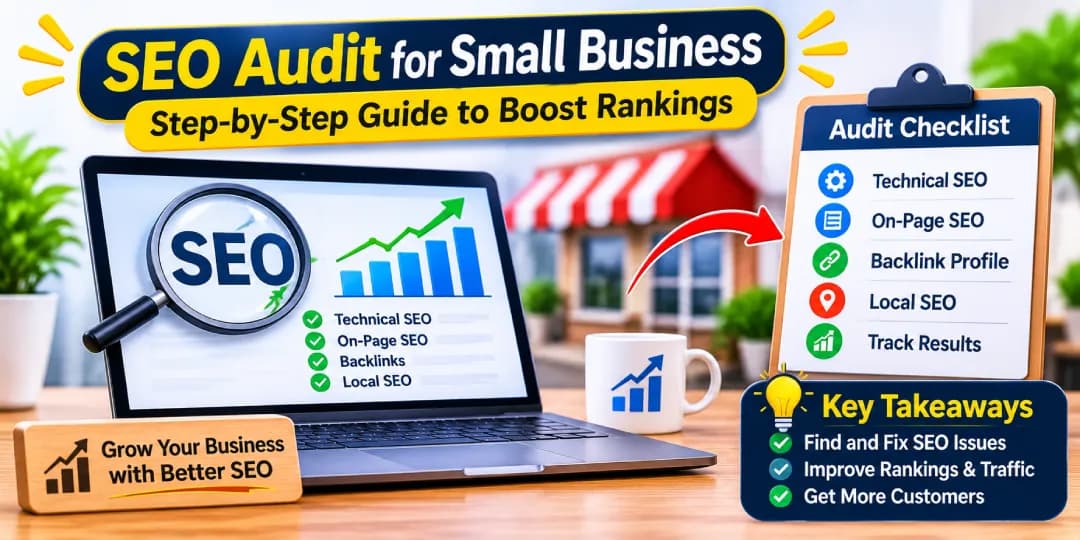
An SEO audit for a small business is a structured review of your website that shows why it is or isn't performing in Google search. It checks technical health, on-page elements, content, backlinks and local SEO signals, then turns the findings into a prioritized action plan. If your site gets little organic traffic, doesn't appear in Google Maps, or isn't producing enquiries, an audit is the most reliable place to start. This guide walks you through the SEO audit process, whether you want to do it yourself or explore our small business SEO audit services.
Table of contents14 sections
What Is an SEO Audit for a Small Business?
Think of it as a health check for your website. You look at how easily search engines can crawl and index your pages, how well each page matches what people search for, and whether your business looks trustworthy online. The goal is not a perfect score. The goal is to find the problems that actually hold back traffic and leads.
What Does a Small Business SEO Audit Include?
A complete audit covers six areas: technical SEO, on-page SEO, content quality, off-page SEO (backlinks and brand mentions), local SEO, and measurement. Larger sites need deeper analysis, but a small site can usually be reviewed thoroughly in a few focused sessions.
The emphasis shifts with the type of site. A local service business should lean on its Google Business Profile, service pages and reviews. Professional service and B2B websites need detailed service pages, clear expertise signals and lead-quality tracking. Ecommerce stores depend on clean product and category structure, and multi-location businesses must confirm that each location has its own page and profile. Lead-generation websites should focus on form performance and conversion tracking. Decide which description fits you before you start, then weight each section of the audit accordingly.
Why Do Small Businesses Need Regular SEO Audits?
Websites change constantly. Plugins update, pages get deleted, staff add new content, and competitors improve. Small issues pile up quietly. A page gets accidentally set to noindex, a redirect breaks, or a Google Business Profile listing goes out of date. Regular audits catch these problems before they cost you customers.
When Should You Audit Your Small Business Website?
Run a full audit at least once a year. Do an extra one when traffic drops suddenly, before a website redesign, domain migration or rebranding, or when you are about to invest in link building or paid content. A lighter quarterly SEO health check is also sensible.
If the audit is part of a redesign or migration, add a risk check before launch. Map every old URL to its new equivalent and plan the redirects, so no page with traffic or backlinks is left without a destination. Confirm that title tags, meta descriptions, canonical tags and internal links carry over to the new site. Then keep your pre-migration traffic and indexing numbers handy for comparison afterwards.
How an SEO Audit Helps Improve Rankings, Traffic, and Leads
An audit connects problems to outcomes. Fixing indexing issues lets important pages appear in search results. Better titles improve click-through rate. Stronger service pages match buying questions, which brings qualified enquiries instead of random visits. In other words, the audit helps you spend limited time and budget where it pays off.
How to Prepare for a Small Business SEO Audit
A little preparation keeps the audit focused. Without it, you end up with a long list of warnings and no idea which ones matter.
Define Your Business Goals and Target Audience
Start with the commercial purpose of the website. Do you want phone calls, form submissions, bookings or online sales? Who are your customers, and what do they type into Google? Every finding later should be judged against these goals.
Identify Your Most Important Website Pages
List the pages that make money or generate leads: your homepage, main service pages, top product or category pages, and contact page. Audit these first. A small site often has 80 percent of its value in a handful of URLs.
Set Up Google Search Console and Google Analytics 4
Google Search Console shows how Google sees your site, including impressions, clicks, indexing status and page experience. Google Analytics GA4 shows what visitors do after they arrive. Both are free, and you need both before you can measure anything. Set up conversion tracking for form submissions and calls at the same time.
Choose the Right SEO Audit Tools
You don't need a large toolkit. You need a few tools you actually understand.
Free SEO Audit Tools for Small Businesses
Google Search Console, Google Analytics, PageSpeed Insights, the Rich Results Test and Ahrefs Webmaster Tools cover most needs for a free SEO audit. Screaming Frog's SEO Spider is also free for small crawls.
Paid SEO Audit Tools for Small Businesses
Semrush Site Audit, Ahrefs, Moz and Seobility add site-wide crawling, an SEO health score, keyword tracking, backlink analysis and competitor comparisons. They save time, but they are optional if your site is small.
Record Your Current SEO Performance as a Benchmark
Before changing anything, save baseline data: organic traffic, clicks, impressions, top keyword rankings, number of indexed pages, and monthly leads. Without a benchmark, a before-and-after comparison is impossible, and you can't prove the audit worked.
How to Conduct a Technical SEO Audit for a Small Business Website
A technical SEO audit checks whether search engines can find, crawl, understand and index your pages. Problems here can quietly cancel out great content.
Check Website Crawling and Indexing
Crawlability is whether search engines can reach your pages. Indexability is whether they are allowed to store them. Both need to be healthy.
Check Whether Important Pages Are Indexed
Type your page URL into the URL Inspection tool in Google Search Console. It tells you whether the page is indexed and, if not, why. The Page Indexing report shows indexed and non-indexed pages across the whole site.
If your site relies on JavaScript to load content or menus, check what Google actually sees. In the URL Inspection tool, view the rendered page and compare it with what appears in your browser. Text, internal links or navigation that exist only after scripts run, or that are missing from the rendered HTML, may never be discovered properly. Where possible, serve key content and links in the HTML itself.
Review the Robots.txt File and XML Sitemap
Open yourdomain.com/robots.txt and make sure it isn't blocking important folders. Then confirm your XML sitemap is submitted in Search Console, lists only indexable URLs, and shows reasonable sitemap coverage.
Identify Crawling and Indexing Restrictions
Look for crawl errors, pages blocked by robots.txt, login walls, and orphan pages with no internal links. Each of these can stop a valuable page from being discovered.
Crawl efficiency matters too. Search engines spend a limited amount of time on any site, and duplicate URLs, filter parameters and low-value pages can eat into it. For most small websites with a few hundred pages, crawl budget is not a serious concern. It becomes important for larger sites, such as ecommerce stores with thousands of filtered URLs.
Server log files show what Googlebot really does. If your hosting provider gives you access, check which pages Googlebot crawls most often, whether your key service pages are being crawled at all, and whether it wastes visits on parameters, old redirects or unexpected URLs. Confirm the visitor really is Googlebot, because other bots can pretend to be it. The Crawl Stats report in Search Console is a simpler place to begin.
Check Noindex Tags and Canonical Signals
A stray noindex tag is one of the most expensive small mistakes. It often appears after a staging site goes live. Check that key pages are indexable and that canonical URLs point where you expect.
Check HTTP Status Codes and Find Broken Links
Every URL returns a status code. 200 means fine, 301 is a permanent redirect, 404 means not found, and 5xx means a server problem.
Identify 404 Errors and Broken Internal Links
Crawl your site and filter for 404 errors. Fix broken internal links first, because they waste crawl budget and frustrate visitors. If an old page has backlinks, redirect it to the closest relevant page.
Check Redirect Chains, Loops, and Incorrect Redirects
A redirect chain sends users through several hops before reaching the final page. Loops never resolve at all. Simplify each one to a single 301 redirect. Also check that redirects go to relevant pages, not just the homepage.
Review Canonical Tags and Duplicate URLs
The same page can sometimes load at several addresses, such as with and without www, with trailing slashes or with tracking parameters. Canonical tags tell Google which version to prefer. Make sure each page has one clear canonical URL and that duplicate canonical URLs don't conflict.
Check HTTPS and Website Security
Your site should load on HTTPS, with every HTTP address redirecting to the secure version. Watch for mixed content warnings, where secure pages load insecure images or scripts. Browsers flag these, and visitors notice.
Audit Website Speed and Core Web Vitals
Slow pages lose visitors before they read a word. Run your main pages through PageSpeed Insights and check the Core Web Vitals report in Search Console. Common causes are uncompressed images, heavy scripts and a slow server response.
Evaluate Largest Contentful Paint (LCP), Interaction to Next Paint (INP), and Cumulative Layout Shift (CLS)
LCP measures how quickly the main content loads, INP measures responsiveness to clicks and taps, and CLS measures unexpected visual layout shifts. Aim for the "good" ratings Google defines for each. Image compression and removing unnecessary scripts fix many problems.
Test Mobile Usability and Responsive Design
Google uses mobile-first indexing, so the mobile version of your site is what counts. Open your key pages on a real phone. Check that text is readable, touch targets are not cramped, menus work, and forms can be completed without zooming.
Review Website Structure and Navigation
Good website architecture lets visitors reach any important page in about three clicks. Use clear, logical categories and clean URL structure. If your best service page is buried five levels deep, search engines will treat it as less important.
Accessibility overlaps with SEO more than most owners expect. Try moving through your key pages with the keyboard only: can you reach menus, links and forms with Tab and Enter, and is the focus visible? Check that pages use semantic HTML, with real headings, lists, buttons and form labels rather than styled generic elements. Make sure images have alt text, and if you can, test a page with a screen reader. Sites that work well with assistive technology tend to be easier for crawlers to interpret and easier for customers to use.
Check Structured Data and Schema Markup
Schema.org markup helps search engines understand your business. Small businesses typically benefit from LocalBusiness or Organization schema, Product schema for shops, and FAQPage schema where genuine questions are answered. Validate your markup with Google's Rich Results Test.
How to Perform an On-Page SEO Audit
On-page SEO is everything you control on the page itself. This is often where small businesses find the quickest wins.
Review Title Tags and Meta Descriptions
Each page needs a unique, descriptive title that includes its main keyword and stays short enough to avoid truncation. Meta descriptions don't directly affect rankings, but a clear one can improve organic click-through rate. Flag missing, duplicate or vague entries.
Remember that the title and description you write are suggestions. Google often rewrites them, so search for your own pages and look at what actually appears. Note which SERP features show up for your target queries, such as featured snippets, image and video results, People Also Ask boxes and the Local Pack. If a competitor holds a snippet, add a concise, direct answer near the top of your page, and use descriptive images and relevant video so your content can appear in those results too.
Check Heading Structure (H1, H2, H3)
Every page should have one H1 that states its main topic, followed by H2 and H3 headings in a logical hierarchy. Headings are for structure, not decoration. Skipping levels or using headings only for styling confuses both readers and crawlers.
Audit URLs for Clarity and Keyword Relevance
Short, readable URLs are easier to understand. A URL like /emergency-plumber-lahore tells everyone what the page is about. Avoid changing existing URLs unless there is a strong reason, and if you do, set up 301 redirects.
Review Keyword Targeting and Placement
Each important page should target one main keyword and a few related terms, placed naturally in the title, H1, opening paragraph and body. Check that the keyword matches search intent. Keyword stuffing hurts readability and does nothing for rankings.
Check Image Optimization and Alt Text
Compress large images, use descriptive filenames, and write alt text that describes what the image shows. Good alt text supports image accessibility for screen readers and helps search engines understand your visuals.
Audit Internal Links and Anchor Text
Internal links pass authority and guide visitors. Link from blog posts to relevant service pages using descriptive anchor text, not phrases like "click here." Make sure no important page is left without internal links.
Review External Links and Their Relevance
Linking out to credible, relevant sources adds value. Check that external links still work and don't point to low-quality or unrelated sites. Remove outdated references.
Audit Service Pages for Search Intent and Conversion Relevance
Open each service page and ask: does this answer what a buyer wants to know? Look for clear descriptions, pricing guidance where possible, proof such as reviews or case details, and an obvious next step. A page can rank and still fail if it doesn't convince.
How to Audit Your Website Content for SEO
A content audit for SEO asks whether each page deserves to exist and whether it serves a real search need.
Evaluate Content Quality, Relevance, and Search Intent
Google favors helpful, people-first content that shows real experience. Search your target keyword and see what ranks. If the top results are guides and yours is a sales page, you may have an intent mismatch.
Identify Thin, Outdated, and Duplicate Content
Thin content offers little value, such as short pages with generic text. Duplicate content includes copied manufacturer descriptions or near-identical location pages. Outdated content has old prices, dates or advice. Mark each page for improvement, merging or removal.
Find Keyword Cannibalization Issues
Keyword cannibalization happens when two or more pages compete for the same query. In Search Console, filter by a keyword and see which URLs appear. If several rank poorly, combine them or reposition each around a distinct intent.
Identify Missing Topics and Content Gaps
Compare your site with the top-ranking competitors. Which questions, services or subtopics do they cover that you don't? Keyword gap and content gap analysis in Ahrefs or Semrush can speed this up.
Check Whether Important Pages Answer Customer Questions
List the questions customers ask before buying: cost, timeline, process, guarantees, service area. If your key pages don't answer them, add short, honest sections or an FAQ.
Review Blog Posts and Service Pages for SEO Opportunities
Old blog posts that already earn impressions are often the easiest to improve. Refresh the information, strengthen the headings, and add internal links to relevant service pages.
Decide Which Content to Update, Merge, or Remove
A simple rule works well. Update pages with potential, merge overlapping ones, and remove pages that have no traffic, no links and no purpose. When you delete or merge, redirect the old URL to the best replacement.
Audit Product and Category Pages for eCommerce Websites
For ecommerce SEO, write unique product descriptions, add Product schema, and make category pages useful with introductory text and clear filters. Avoid indexing endless filter combinations that create duplicate pages.
How to Conduct a Local SEO Audit for a Small Business
If you serve customers in a specific area, a local SEO audit matters as much as the technical review.
Audit Your Google Business Profile
Confirm your categories, services, hours, photos, website link and description are accurate and complete. Check that posts and questions are monitored. An incomplete profile is one of the most common reasons businesses miss the Google Local Pack.
Also check that your profile follows Google's Business Profile guidelines. Only eligible businesses can be listed, and the name, categories and service-area settings must reflect reality. A wrong primary category or a poorly defined service area can keep you out of the right searches. Look for duplicate profiles, and treat any suspended or ineligible listing as urgent, since it has to be resolved with Google before other local work will pay off.
Check NAP Consistency Across Online Directories
NAP means name, address and phone number. They should match exactly on your website, Google Business Profile and every directory. Inconsistent details confuse search engines and customers.
Review Local Citations and Business Listings
Citations are mentions of your business on directories and industry sites. Look for duplicate listings, old addresses and missing major directories. Fix incorrect ones first.
Analyze Local Keywords and Search Rankings
Track how you rank for local search queries such as "service \+ city." Because results vary by location, check rankings at city level, or use a rank tracker like Seobility's ranking monitoring.
Keep Google's local ranking factors in mind while you review the results: relevance, distance and prominence. Relevance is how well your profile and website match the search, distance is how far you are from the searcher, and prominence reflects how well known your business is, shaped by reviews, links and citations. You can't change distance, so most of your effort belongs in the other two.
Review Customer Ratings and Online Reviews
Read recent reviews. Look at volume, average rating and how you respond. Replying politely to negative reviews shows future customers how you handle problems.
Audit Location Pages and Localized Website Content
Each service area page should contain genuinely local content, not a template with the city name swapped. Add local details, photos, testimonials and directions where relevant.
If you serve customers in more than one country or language, add hreflang annotations so Google can show each audience the right version. Check that every regional version references its alternates correctly, and that similar pages for different countries are not competing with each other or being treated as duplicates. Choose a clear structure for country targeting, such as subfolders, subdomains or country-code domains, and keep it consistent. Most local businesses won't need this, but those that do often find their biggest problems here.
Analyze Local Competitors and Their Search Visibility
See who appears in the map pack for your main searches. Compare their review counts, profile completeness, website content and local backlinks to find realistic ranking opportunities.
How to Audit Your Website's Backlinks and Off-Page SEO
Off-page SEO reflects how the wider web views your business.
Review Your Website's Backlink Profile
Use Ahrefs Webmaster Tools, Semrush or Moz to see incoming backlinks and referring domains. Note which pages attract links and how the profile changes over time.
Identify Relevant and High-Quality Backlinks
A few links from relevant, trusted sites beat dozens from random ones. Local newspapers, suppliers, associations and industry sites are strong examples.
Find Potentially Harmful or Suspicious Backlinks
Watch for obviously purchased links, spammy directories and manipulative patterns. Google usually ignores low-quality links, so only take action, such as disavowing, if you have a clear problem or a manual action.
If Search Console reports a manual action for unnatural links, that is your signal to remove or correct the offending links and request a review.
Analyze Competitor Backlinks and Link Opportunities
Review where competitors earn links. Local press coverage, guest blog opportunities, partner websites and business directories often reveal ethical link building options you can pursue too.
Review Brand Mentions and Online Authority
Search for your business name. Unlinked mentions are chances to ask for a link. Brand mentions across the web also help search engines, and AI search platforms such as ChatGPT, Gemini and Perplexity, recognize your business as a real entity.
How to Use Google Search Console to Find SEO Opportunities
Search Console is the closest thing to Google telling you what's happening.
Analyze Clicks, Impressions, CTR, and Average Position
Open the Performance report and compare the last three months against the previous period. Impressions show visibility, clicks show demand captured, and average position shows how close you are to page one.
Identify Pages with High Impressions but Low Click-Through Rates
Sort pages by impressions, then look for those with weak click-through rate. Often the title or snippet is the problem. Rewrite it to match what searchers expect.
Find Keyword and Ranking Opportunities
Filter for queries ranking in positions 8 to 20\. Small improvements to content, internal links or titles can push them onto page one.
Identify Pages Losing Organic Search Traffic
Compare date ranges and sort by click decline. Investigate whether a page lost rankings, was changed, became outdated or has an indexing problem.
Review Indexing Reports and Page Experience Issues
Check the Page Indexing, Core Web Vitals and mobile usability reports for new errors. Validate fixes inside Search Console so Google rechecks them.
Also open the Manual Actions and Security Issues reports. A manual action means a Google reviewer has penalized your site for breaking spam policies, such as unnatural links or thin content, and the report names the problem and the affected pages. That differs from an algorithmic ranking drop, which comes with no notice and usually reflects a core update or a quality issue you have to diagnose yourself. Security Issues flags hacked content, malware and deceptive pages. If either report shows a problem, fix it before anything else and submit a review request.
How to Audit Website Usability and Conversion Performance
Traffic only matters if visitors take action.
Review Website Navigation and User Experience
Browse your site as a first-time customer. Can you find services, pricing and contact details quickly? Check navigation menus on mobile and fix broken user journeys.
Check Contact Forms, Phone Links, and Contact Information
Submit your own forms and tap your phone links on mobile. Make sure notifications arrive and contact details are correct everywhere.
Evaluate Calls to Action on Important Pages
Each key page needs one clear next step. Review CTA buttons for visibility, wording and placement.
Check Conversion Tracking and Analytics Configuration
Confirm GA4 records form submissions, calls and purchases as conversions. Call tracking helps attribute phone leads to organic search.
Identify Barriers That Prevent Visitors from Becoming Customers
Common barriers include slow pages, long forms, unclear pricing, missing trust signals and confusing checkout steps. Remove them one at a time and measure the effect.
How to Create an SEO Audit Report for a Small Business
A good report turns findings into decisions.
What to Include in an SEO Audit Report
Keep it clear and evidence-based.
SEO Issues and Affected URLs
List each problem along with the specific pages affected, so developers or writers know exactly where to look.
Evidence, Impact, and Recommended Fixes
Include a screenshot or data point as audit evidence, explain why the issue matters, and state the recommended fix in practical terms.
Priority, Estimated Effort, and Assigned Owner
Give each item a priority level, rough effort and a responsible person. This prevents a report from becoming a document nobody acts on.
How to Present Audit Findings to Business Owners
Lead with business outcomes, not jargon. Show three to five high-impact fixes first, explain the expected benefit, and keep technical detail in an appendix.
How to Prioritize and Fix SEO Audit Issues
Most audits produce more issues than you can fix in a month. Prioritization is what makes the work achievable.
Separate Critical SEO Errors from Minor Warnings
Critical problems block visibility or revenue, such as noindex on key pages, broken checkout, or a blocked site. Minor warnings, such as a slightly long meta description, can wait.
Prioritize Fixes Based on Impact, Effort, and Business Value
Start with high-impact, low-effort fixes. Then schedule high-impact, high-effort projects. Leave low-impact items for later. Pages tied to revenue always come first.
Create a Practical SEO Audit Action Plan on a Limited Budget
Spread work over weeks: week one for indexing and broken pages, week two for titles and service pages, week three for Google Business Profile and citations, and week four for content updates. Small, steady progress beats a rushed overhaul.
How to Measure SEO Audit Results and Verify Fixes
Fixing is only half the job.
Recheck Fixed Technical and On-Page SEO Issues
Recrawl the site, inspect key URLs again and confirm deployment worked. Fixes sometimes fail silently.
After a redesign or migration, test every redirect in your map, confirm canonical tags and metadata survived, and compare traffic, rankings and indexed pages with your pre-migration numbers. Keep watching the Page Indexing report for several weeks, because problems often show up gradually.
Track Organic Traffic, Rankings, and Search Visibility
Compare organic traffic, impressions, clicks and keyword tracking against your benchmark. SEO results usually take weeks or months, so judge trends, not days.
Measure Leads, Calls, and Website Conversions
Track form submissions, calls and revenue from SEO. Traffic that doesn't convert tells you the problem lies elsewhere.
How Often Should a Small Business Repeat an SEO Audit?
A full audit once a year, a lighter review every quarter, and monthly checks of Search Console are enough for most small businesses.
Small Business SEO Audit Checklist
Technical SEO Audit Checklist
- Important pages are indexed and sitemap is submitted
- Robots.txt and noindex tags are correct
- No 404 errors, redirect chains or loops
- HTTPS works with no mixed content
- Core Web Vitals and mobile usability pass
- Schema markup validates
On-Page SEO Audit Checklist
- Unique titles and meta descriptions
- One H1 and logical heading hierarchy
- Clear URLs and sensible keyword placement
- Compressed images with alt text
- Descriptive internal links
Content SEO Audit Checklist
- Content matches search intent
- Thin, outdated and duplicate pages handled
- Cannibalization resolved
- Content gaps listed
- Customer questions answered
Local SEO Audit Checklist
- Google Business Profile complete
- NAP consistent everywhere
- Citations clean and reviews answered
- Location pages are unique
Off-Page SEO Audit Checklist
- Backlink profile reviewed
- Harmful links checked
- Competitor link opportunities listed
- Brand mentions followed up
Google Search Console and Performance Checklist
- Clicks, impressions and CTR reviewed
- Low-CTR pages rewritten
- Position 8 to 20 keywords improved
- Declining pages investigated
Website Usability and Conversion Checklist
- Forms and phone links tested
- Clear CTA on each key page
- Conversion tracking active
- Conversion barriers removed
Frequently Asked Questions About SEO Audits
How Much Does an SEO Audit Cost for a Small Business?
It varies widely. A DIY audit with free tools costs only your time. Paid tools add a monthly subscription, and a professional SEO audit service depends on site size, depth and the agency or consultant you choose. Ask for a sample report before you buy.
Can I Perform an SEO Audit Myself?
Yes, for a small site. Google Search Console, a crawler and this checklist cover most issues. Consider a professional if you face a traffic drop, a migration or complex technical problems.
How Long Does a Small Business SEO Audit Take?
A basic audit can take a day or two, while a thorough one with competitor and backlink analysis may take a week or more. Implementing fixes takes longer than finding them.
What Is the Best Free SEO Audit Tool for Small Businesses?
Google Search Console is the most useful because it uses Google's own data. Pair it with PageSpeed Insights and a free crawler for a well-rounded free SEO audit.
Does an SEO Audit Guarantee Higher Google Rankings?
No. An audit identifies problems and opportunities. Rankings depend on how well you act on them, plus competition and ongoing content quality. Be cautious of anyone who promises guaranteed positions.
Can a Small Business Website Rank Without an SEO Audit?
It can, especially in a low-competition area. However, without an audit you can't see hidden issues, so the site may rank below its potential. Even a basic check is a worthwhile investment.