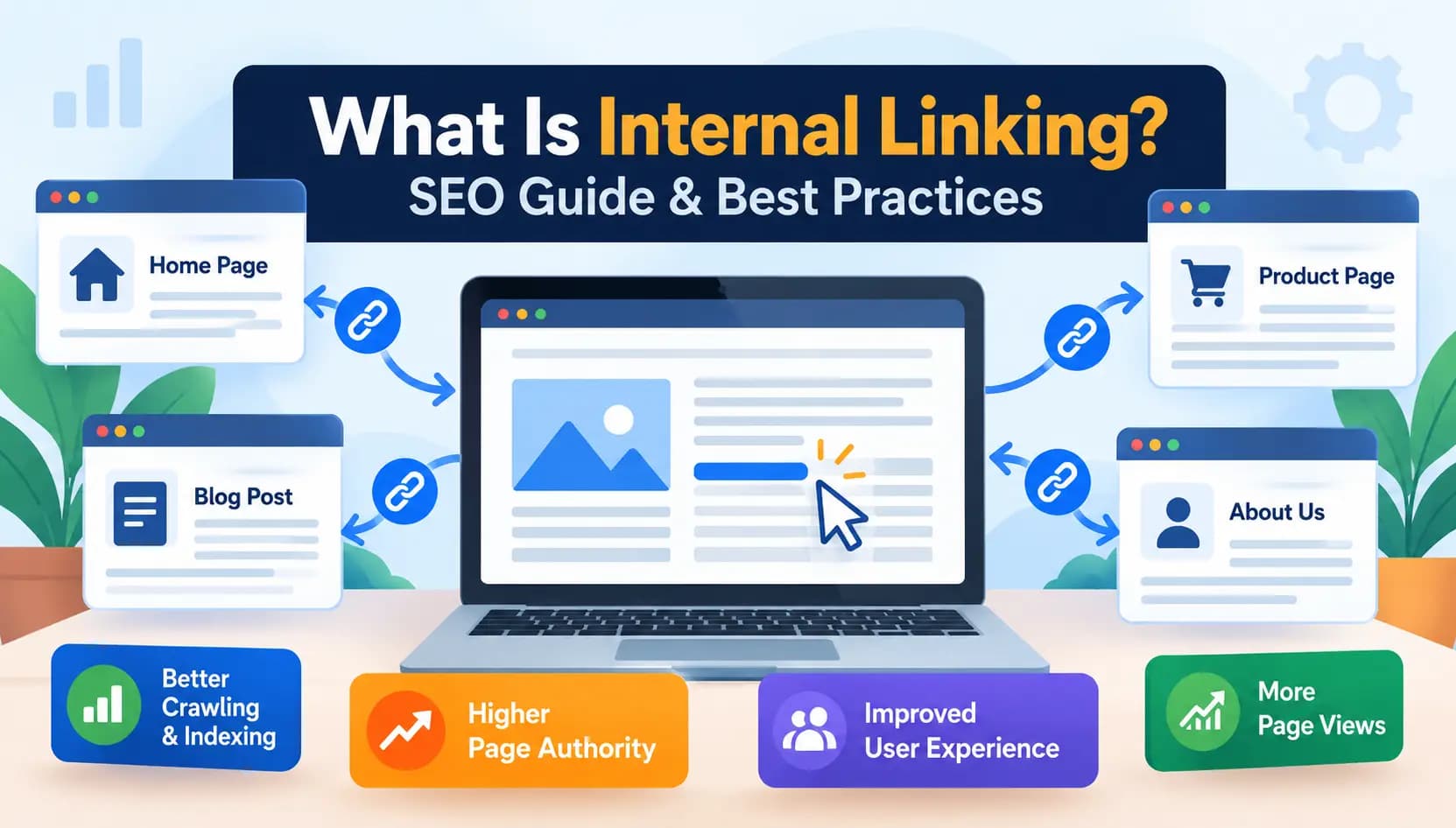
What is internal linking? Internal links are a website’s links that connect to other pages on that website. More specifically, internal linking is the practice of connecting one page to another page on the same domain via hyperlink. These links allow search engines to ‘crawl’ and understand your website, and allow users to view further related content.
Internal links serve different purposes when looking at a visitor versus a search engine. A visitor needs a way to find the information they are looking for, so you give them paths to content via internal links. For search engines, internal links give them a way to find and index your site's navigational structure.
This guide is a great way for beginners to understand the basics of internal linking. It teaches essential concepts surrounding internal linking that when understood, have the potential to be effective for SEO. This guide is constructed to avoid explanation for the sake of avoiding complications.
Internal Linking: Types, Benefits, Best Practices & Strategy
What Is Internal Linking? (Definition & Basics)
Internal Link Definition (Simple Explanation)
An internal link is a link that connects pages of the same domain. One example of an internal link is clickable text that will take the user to another page within the same domain. Internal links are easy and not complicated. They are used to connect web pages that are related. It is important to have links where it makes sense and follows a pattern or structure so it makes sense to the user/reader.
Internal Links vs. External Links vs. Backlinks
Let’s look at a common example of confusing user behavior. Internal links only relate to pages on your site. All the rest of the links relate to pages on other sites, for example, if you linked to a picture from another source or to a study located on another site. Backlinks are links from other websites to yours. Internal links are links on your website. Internal links are critical to SEO, but as for internal links, you can decide how all the links on your domain are created. For external links, you can only decide how your site builds its links, and you cannot control what other external sites build their links as.
Example of an Internal Link (HTML \+ Real-World Example)
In HTML, an internal link looks something like this:
`<a href="/blog/seo-basics">Learn the basics of SEO</a>`
Pretend you sell winter coats online and write a blog about the best winter coats. To do internal linking correctly, you must include a link to your coats' category page in your post. Doing so provides the reader with access to purchase the product and provides additional information.
Types of Internal Links
Navigational Links (Menus, Footer, Breadcrumbs)
The major links within your website structure serve various navigation functions for websites including the main menu, footer menu, and breadcrumbs. Although navigation links serve their primary function during site navigation, search engines also use navigation links to better understand and catalog your website.
Contextual/Content Links (In-Body Links)
Contextual links are natural links within written content that can link a phrase in a blog post to a related article. These links are more valuable for SEO than navigational links, because contextual links provide additional and related text. In addition to the link, search engines evaluate the related text and the page it references.
Sitelinks (Search Engine Generated)
There are a few distinctions between sitelinks and other links... However, search engines create sitelinks with no direct intervention from the user. They appear underneath the primary result for search queries that typically include a brand name. There is currently no way to manage sitelinks for your page, but Google claims to create good sitelinks for pages that have a well-planned internal linking systems.
Why Internal Linking Is Important for SEO
Helps Search Engines Crawl and Index Pages
Crawlers use links to crawl web pages. Therefore, any web page without an inbound link is undetectable by crawlers. Crawlers will never see those pages and those pages will never be indexed.
Distributes Link Equity (Link Juice / Page Authority)
Internal links allow you to distribute a page’s backlinks and authority to other pages on the website. Link juice, or link equity, is the name given to this distribution of authority. Internal links placed on your high ranking or home page can be used to pass authority to other pages on your site.
Prevents Orphan Pages
An “orphan” page is a standalone page, meaning that a page has no connecting links. Because of the lack of surrounding links, both search engines and users have great difficulty locating these pages. Because of this, they often go completely unrecognized, and more often than not, are completely skipped. This is because the content on these pages can be useful to the users.
Improves User Experience and Navigation
Good internal linking enables visitors to navigate your site intuitively, leading them naturally to subsequent relevant pieces of content. Without internal linking, visitors must leave your site to determine what content they should engage with next.
Reduces Bounce Rate and Increases Page Views
Readers find more related articles through properly placed internal links. Readers tend to stay on links longer and explore more pages on the site. As a result, page views, and site engagement improve, and bounce rates tend to fall.
How Internal Linking Works (Behind the Scenes)
How Link Equity Passes Between Pages
Search engines consider a webpage's inter- and intra-linking structures when measuring authority. Internal linking helps get the authority from one page to another. If a page is linked from a more authoritative page, it helps the destination page rank better when someone searches for the page.
Role of Site Structure and Site Architecture
Site architecture, or how pages on your site are designed to connect to one another and how your site is organized, can significantly impact link equity flow throughout your site. Logical, flat site architecture performs better than deep site architecture in which important site pages are buried several levels deep within the site.
Internal Links and Topical Authority (Topic Clusters & Pillar Pages)
Building topic clusters around a central pillar page is one of the most efficient internal linking techniques today. A pillar page includes an extensive range of information on a specific subject with several related subtopic pages linking to it and to other subtopic pages. Search engines know how much information you have about a subject and how organized you are. They use that information to grant you topical authority.
Internal Linking Best Practices for SEO
Use Descriptive, Natural Anchor Text
A hyperlink's visible text—anchor text—is compelled to summarise the page being linked. "Click here" should never be the anchor text. Instead, give users and search engines an idea of the page being linked by adding descriptive text.
Link to Relevant and Related Pages
Link only to relevant pages when it is of value to the reader. Unrelated links can actually cause the user experience to decline.
How Many Internal Links Per Page Is Ideal
There is no perfect number, but for most posts, three to ten internal links usually works.This depends on the length of the post and how much you have written on the subject. Longer posts can easily accommodate more links.
Prioritize Important Pages With More Internal Links
To show search engines what pages are most important, like pillar content or key service pages, pages should receive internal links from other pages on your site. This is generally done by having more internal links on those pages.
Avoid Too Many Internal Links on One Page
If there's a list of links without narration, each link won't hold much value, and it could overwhelm the readers. Having a link in every sentence won't convey importance in any of the links.
How to Build an Effective Internal Linking Strategy
Step 1 — Perform an Internal Link Audit
First, check your current internal links using Ahrefs, Semrush, or Moz. This helps you visualize your internal linking structure prior to any changes.
Step 2 — Identify Orphan Pages and Broken Internal Links
Seach for webpages that internal links do not lead to, and site pages that broken links lead to error pages. These slowly damage SEO performance.
Step 3 — Map Pillar Pages to Supporting Content (Topic Clusters)
Identify your core topics and use that to group related information around them to form a clear pattern of internal links and build up on topical authority.
Step 4 — Add Contextual Links While Creating New Content
Design content workflow to prioritize internal link building to avoid doing this as a one-time, afterthought.Take advantage of publishing opportunities and incorporate relevant internal links.
Step 5 — Monitor and Update Internal Links Regularly
Internal links are not set and forget. Revisit your structure often. Reconnect pages after publishing new content or old content is removed.
Common Internal Linking Mistakes to Avoid
Broken Internal Links
Empty links generate a poor user experience and waste crawl budget. Conducting regular audits ensures that no damage is done.
Overusing Exact-Match Anchor Text
It can appear manipulative to search engines to have the same exact-match anchor text repeated across your website. Natural variation of anchor text is recommended with a focus on descriptive text.
Ignoring Orphan Pages
Content that isn't linked to has a very small chance of being seen. Make sure to check orphan pages during content audits.
Excessive or Irrelevant Internal Linking
Adding links without concern for relevance for the sake of having more internal links is a sure way to have them ignored. Provide value first and foremost.
Best Internal Linking Tools (Free & Paid)
Moz, Ahrefs, and Semrush for Internal Link Analysis
Internal link analysis includes showing the most linked pages, orphaned pages, and areas where link equity is most concentrated. These platforms provide thorough internal link analysis.
Yoast SEO for WordPress Internal Linking
For WordPress users, Yoast SEO has some unique approaches for internal linking which allows users to make relevant links during content creation within the content editor.
How to Check Internal Links on a Page or Website
There are at least two ways to check internal links. First, you have to view the source code of a page. Second, you can use a tool like Screaming Frog. It generates a full internal link report after crawling your entire website.
Internal Linking Examples by Website Type
Internal Linking for Blogs
Blogs create a structure of related links within their posts as well as through topic clusters.
Internal Linking for E-commerce Websites
Internal linking used in e-commerce joins product pages and category pages and buying guides in order to help users find related items and streamline conversion paths.
Internal Linking for WordPress Sites
Plugins for internal linking in WordPress are abundant. WordPress suggests a few pages that users can directly link to, but contextual linking inevitably performs better for SEO.
\---
Watch: Internal Linking Explained (Video Walkthrough)
Step-by-Step Visual Guide to Building an Internal Linking Structure
Some people learn best from seeing examples. A step-by-step video of how to identify orphan pages and how to build a topic cluster would show internal linking in practice.
Conclusion
While Internal Linking might feel like something small and trivial on your website, it has the ability to subtly impact search engines and user experience. Internal Linking has previously unrealized capabilities that can change how your site is crawled and how quickly page authority is distributed. The best way to see these benefits is to prioritize it in your content creation, ensure that your links are compliant during audits, and always evaluate the quality of the links over the quantity presented.
What is internal linking in SEO?
Internal linking needs to be done regularly. Look at your site structure often, especially after publishing new pages or removing old pages.Internal linking is used in SEO to raise the level of crawlability and enhance navigation throughout a site.
What is the difference between internal and external linking?
Internal links point to pages within the same domain, while external links point to pages on a different website entirely.
How many internal links should a page have?
There's no strict number, but most pages benefit from a handful of relevant internal links, typically between three and ten, depending on content length.
Do internal links help SEO rankings?
Yes, internal links help distribute page authority, improve crawlability, and support topical relevance, all of which can positively influence rankings.
What is a good example of internal linking?
Linking a blog post about a specific topic to a related pillar page or product page on the same site is a common and effective example.
How do I find broken internal links on my website?
Tools like Screaming Frog, Ahrefs, or Semrush can crawl your site and flag any broken internal links for review.
What is the best internal linking strategy for e-commerce sites?
Connecting product pages to relevant category pages and buying guides tends to work well, guiding shoppers naturally through the buying journey.
Does linking to other websites (external links) help SEO?
Yes, when done thoughtfully, external links to credible, relevant sources can support content trustworthiness and provide additional context for readers.