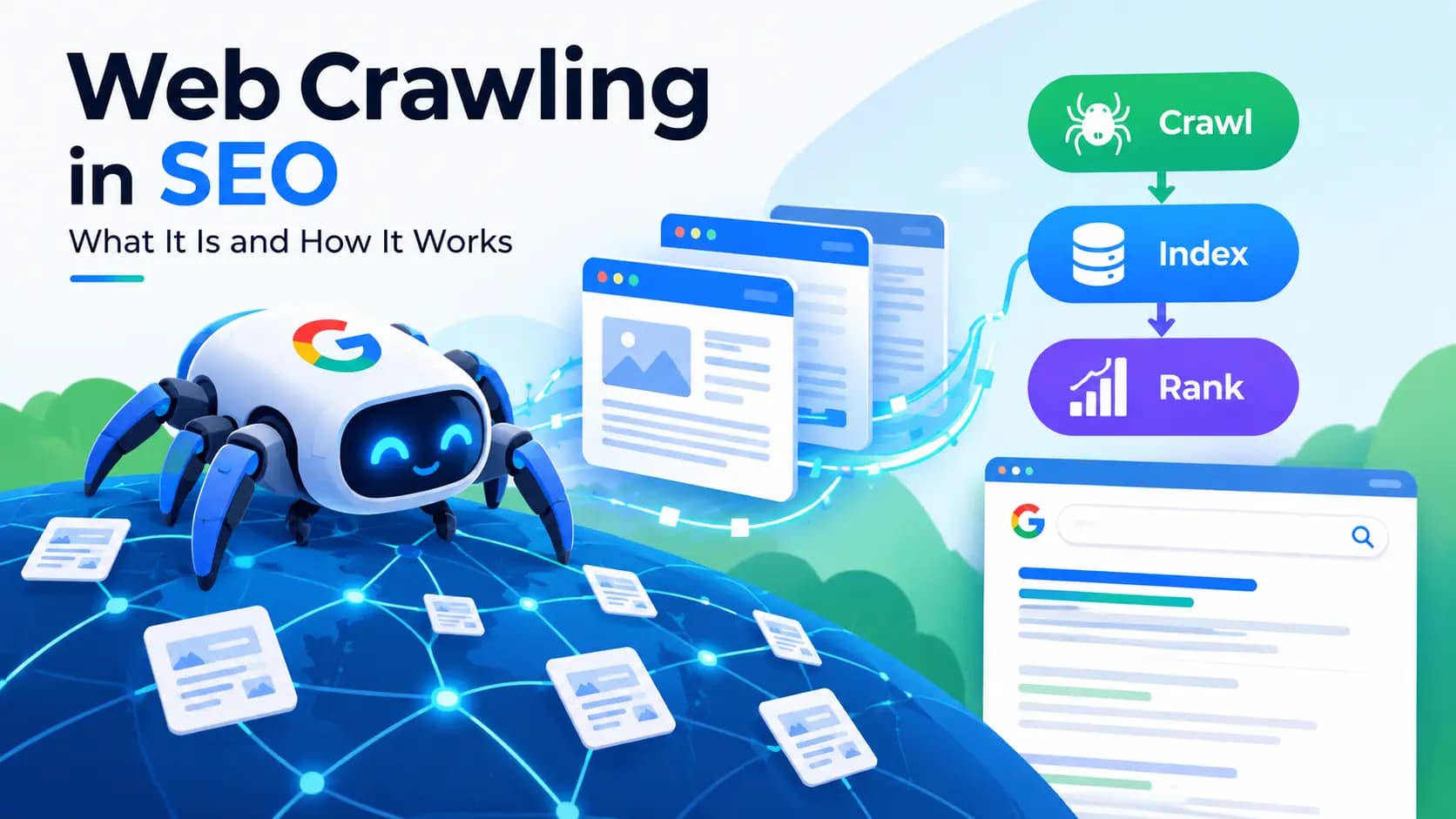
Crawling involves visiting pages in an orderly, methodical way. On the internet, this means that crawlers are automated programs that visit web pages and gather data. If you have ever wondered about how Google seems to magically know about a page just a few days after it was published, then you have crawling to thank for that. Crawling is the first thing search engines do to allow a page to appear within their search results. Understanding crawling helps us all to understand how SEO actually works.
Understanding Web Crawling and Its Role in SEO
Crawling Meaning: The Basic Definition
Before diving into the technical side, it helps to understand what the word "crawling" means on its own.
Crawl Definition (Dictionary Sense)
According to the Cambridge English Dictionary and Collins English Dictionary, to crawl in everyday language means to move with great effort or to move with drag on the ground, or to move on hands and knees. Crawling is something you might see a baby do to cross the room or perhaps how an ant crawls across a tree. The action is used in the simple and progressive tenses of the perfect forms. For example, "the traffic was crawling" or "she has been crawling toward the finish line." Technology somewhat defines the meaning of crawl thus. The definition is slow and steady movement.
How the Term "Crawling" Is Used in Different Contexts
Aside from technology, "crawl" is used to describe something that happens slowly. This happens with lots of things we encounter day to day: traffic crawling through the city, a plant crawling on a wall, and the concept of a pub crawl where people move slowly from one location to the next. In the digital realm, the meaning of "crawling" softwares is much more clear. Software crawling through the web pages deliberately analyzes them page by page, much like that original description of the movement.
What Is Web Crawling in SEO?
In SEO and search engines, crawling means following automated instructions to browse the web to look for new or updated content. Without crawling, there is no foundation for any other work in SEO. If a page hasn’t been crawled, the search engines cannot find the content in that particular page. For the search engines, that page does not exist.
Crawling Definition in the Search Engine Context
“Crawling websites” describes how some search engines deploy bots to read content on web pages and traverse the more than a billion linked paths across the internet. Search bots are sometimes called spiders and robots. Search bots come to read the content on pages the moment they are created.
Note: Answers affected by automated plagiarism checkers. Plagiarism is considered intentional.
Crawling vs. Indexing vs. Ranking (Clarifying the Difference)
Separating crawling, indexing, and ranking becomes important when working in the field and stuff gets jumbled. Crawling is elementary. It’s the search engine going through every page to see what is out there.
Indexing is the search engine figuring out what crawled content is important enough to be stored in their database. Ranking is where search engines figure out where on the search results page an indexed page should appear.
Crawled pages get ignored without indexing, and pages can be indexed without being ranked well. Each of the three steps is judged based on the previous one.
What Is a Web Crawler (Search Engine Spider)?
A web crawler is the actual software responsible for doing this scanning work. It's a program built to move across the internet, following links and collecting data from each page it visits.
Web Crawler Definition
In simple terms, web crawlers are automated web browsers that retrieve and collect information about the sites they visit consisting of text, images, links and other information about the page in question. This data is retrieved and is sent back to be processed and potentially indexed.
Common Names: Spider, Bot, Robot, Search Robot
These technologies are called many things, but they all do the same thing; crawler, spider, bot, search robot, or web robot. The nickname “Spider” is used because just as a spider moves around its web and touches one strand (or link) at a time, the bot moves throughout the web touching one link at a time.
Examples of Search Engine Crawlers (Googlebot, Bingbot, etc.)
Most search engines have their own crawlers. Google uses one called Googlebot. It's also known as the Google spider or the Google crawler. Similarly, Bingbot is the crawler for Bing.
Some companies use crawlers for different tasks, and even some artificial intelligence (AI) companies use crawlers to collect data and answer queries.
Other search engines, like WebCrawler.com, also built crawling systems in the past. Now most search engines are dominated by Google and Bing.
How Do Web Crawlers Work?
Understanding the mechanics helps make the whole process less abstract.
Step-by-Step Crawling Process
Search engines have methods for discovering, indexing, and cataloging pages without you submitting URLs to search engine web crawlers manually. These systems cycle endlessly through a list of known URLs.
Crawlers begin exploring web pages from lists of known URLs, mostly from sitemaps or known pages. Crawlers visit a web page, and analyze the content. A crawler then follows the links on the analyzed web page to discover news links.
The crawlers add the discovered links to the known URLs list. These systems give search engines the tools to catalog the web's content without crawlers visiting each page manually.
How Crawlers Discover New Pages (Links, Sitemaps, URLs)
There are a few ways crawlers discover new pages. One is through links both within and beyond pages that link to yours. Crawlers that follow those pages will find yours too. Giving Google Search Console access to your XML sitemap is also a reliable approach.
Search engines can also discover URLs through other methods such as when a page has been posted or referenced somewhere else.
Crawl Budget and Crawl Rate Explained
Search engines can crawl pages one at a time, but it would take forever to crawl every page of every website. The solution is the crawl budget. Crawl budget is the number of pages that a search engine can crawl within a specified time.
For large websites in the thousands of pages, the crawl budget needs to be thought about. The crawl budget is not something small five page business websites have to worry about. Crawl rate is how often a page is crawled, and can be controlled to a certain extent with Google Search Console.
Why Is Crawling Important for SEO?
Crawling isn't just a technical detail — it's the gateway to everything else in search visibility.
The Role of Crawling in Getting Pages Indexed
There’s no indexing without crawling. If a page can’t be crawled, it can’t be indexed and will never show up in search results, no matter how many SEO tricks have been used for the page. Hence, technical SEO is important, so websites are designed in a way that ensures bots crawl and easily navigate through web pages.
How Crawling Impacts Search Visibility
If your site has crawl errors, blocked pages, or a confusing link structure, search engines may struggle to find and process your content properly. As a result, even great content can go unnoticed simply because it was never crawled in the first place. Fixing crawlability issues is often one of the fastest ways to improve overall search performance.
Types of Web Crawlers
Not all crawlers serve the same purpose, and it helps to know the differences.
Search Engine Crawlers (Google, Bing)
These are the crawlers that power actual search results. Googlebot and Bingbot fall into this category, and their job is to build the index that powers everyday search queries.
SEO Crawlers and Site Audit Tools
There are crawlers for SEO website audits that are not the same as search engines. Site bulb and Screaming Frog and other crawling software are used by the SEO community to examine a website for broken links, missing meta data, duplicate content, and other issues that can potentially cause the ranking of websites to decline.
AI Web Crawlers
Lately, AI companies use crawlers to generate data for training models, and also to support real-time AI search. While, traditional search crawlers, build search indexes. These crawlers feed data into AI systems, rather than search indexes.
Common Crawling Issues and How to Control Crawlers
Even well-built websites run into crawling problems from time to time.
Pages That Are Not Crawlable (Causes)
There are various reasons why pages become uncrawlable. Pages can become blocked in some coding files called robots.txt and HTML files with a tag called “noindex”. Pages can also be uncrawlable if they do not have any links to other pages.
Lastly, pages can be deep within a site’s structure which makes the crawlers unable to reach those pages. Broken navigation and excessive use of JavaScript in page code can also cause problems if implemented poorly.
Using Robots.txt to Manage Crawler Access
Site owners can use the robots.txt file to tell crawlers about areas of the site that crawlers can access, and areas they should not access. This is useful for limiting access to admin sections of a site as well as hidden duplicate content locators.
It can also be used to hide content that shouldn't show up in search results. Keep in mind that misconfigured robots.txt files have been known to block crawlers from accessing important pages of a site.
Common Crawling Mistakes to Avoid
Accidentally blocking site sections, forgetting to update the sitemap after a big site restructure, creating pages that have no way to get to them, and having too much waste in your ‘crawl budget’ (time and resources spent crawling pages) are a few of the typical mistakes that people make. These errors can do damage to a website’s visibility without you knowing it.
How to Check and Improve Website Crawling
Once you understand the basics, the next step is putting that knowledge into practice.
How to See If Your Site Has Been Crawled
In my opinion, Google Search Console is the preferable option. The Crawl Stats report displays the frequency of visits from Googlebot, the pages and any errors accessed, and any encountered errors.
In the case that you monitor the report regularly, you can eliminate and solve barriers to your site ranking before it may adversely affect your ranking.
Best Practices to Help Search Engines Crawl Your Site Efficiently
Structural changes can make a dramatic difference in site quality. To improve site structure, make sure you maintain the most important pages as close as possible (click-wise) from the home page, develop a clear internal link structure, submit a new site map, and resolve broken links as they occur. Page loading speed improves crawling efficiency as crawlers only roughly spend a given time on each website in a session.
Web Crawler Tools You Can Use
If you want to see crawling in action or audit your own site, several tools make this accessible.
Free Website Crawler Tools
Free tools like Screaming Frog's version, Google Search Console, and site crawler tools on the web let you analyze a few pages for no cost. This is typically enough for sites with a smaller number of pages.
Site Crawler Software for SEO Audits
Some site crawlers let you crawl your own site like search engines do. The advantage they can provide is that they can give you reports on issues before the issues affect your site's performance in search results.
With some tools, you can detect issues on a site that has thousands of pages. These can include issues like duplicate content, redirect chains, missing alt text, and other structural issues.
Conclusion
Crawling is the foundation for all processes in search. This activity can be considered slow and methodical if we think about how we crawl on an everyday basis, and as a process where web pages are scanned methodically by bots.
For someone working on a website, crawling is an important activity that is the most effective way to improve a website's search visibility. It is important to understand how crawling works, and by making a site crawlable, it is an easy, yet efficient method.
What is crawling in simple words?
Crawling is the process where automated bots visit web pages, read their content, and follow links to discover more pages, similar to how a person might slowly explore one room after another in a large house.
What is the difference between a web crawler and a search engine?
A web crawler is just one part of a search engine. The search engine also includes an index (where crawled data is stored) and a ranking system (which decides the order of results).
What is a web crawler used for?
It's used to discover, scan, and collect information from web pages so that search engines can index and eventually rank that content in search results.
How do search engine spiders find new pages?
They typically follow links from already-known pages, read submitted XML sitemaps, or discover URLs through other referenced sources online.
What does it mean when a page is "not crawlable"?
It means a search engine bot cannot access or read that page, often due to robots.txt restrictions, missing internal links, or technical errors.
s crawling the same as indexing?
No. Crawling is the discovery and scanning stage, while indexing is when the search engine decides whether to store and organize that content for search results.
What is an example of a crawler-based search engine?
Google and Bing are the most well-known examples, both relying on their own crawlers, Googlebot and Bingbot, to build their search indexes.
Can I stop search engines from crawling certain pages?
Yes, using a robots.txt file or a "noindex" meta tag, you can restrict or prevent crawlers from accessing specific pages.
What is the best free tool to crawl a website?
Google Search Console is a strong starting point, and tools like Screaming Frog's free version work well for smaller-scale site audits.
How often do search engines crawl a website?
This varies by site and depends on factors like how frequently content changes, overall site authority, and available crawl budget, but active sites with fresh content tend to get crawled more often.