Like other performance metrics, Largest Contentful Paint (LCP) measures how quickly a page loads. The difference, however, is in the aspect of the page that LCP focuses on. In the case of LCP, the focus is on the main, largest, and most significant content on the page. For example, this could be a hero image or a large section of text on the main page. For a metric to be useful, it needs to have a clear definition. It is clear that LCP tells the user how quickly the largest and most important content of the webpage loads for the user after a page is requested. Google uses LCP to assess the overall user experience of a page and thus a slow LCP can greatly affect your rankings, even if the rest of the site is technically in order.
Largest Contentful Paint: Meaning, Measurement, SEO & Optimization
What Is LCP (Largest Contentful Paint)?
Understanding the why behind how GoogleUpdated Trackers is helpful to evaluate the effects of this development.
LCP Meaning and Definition
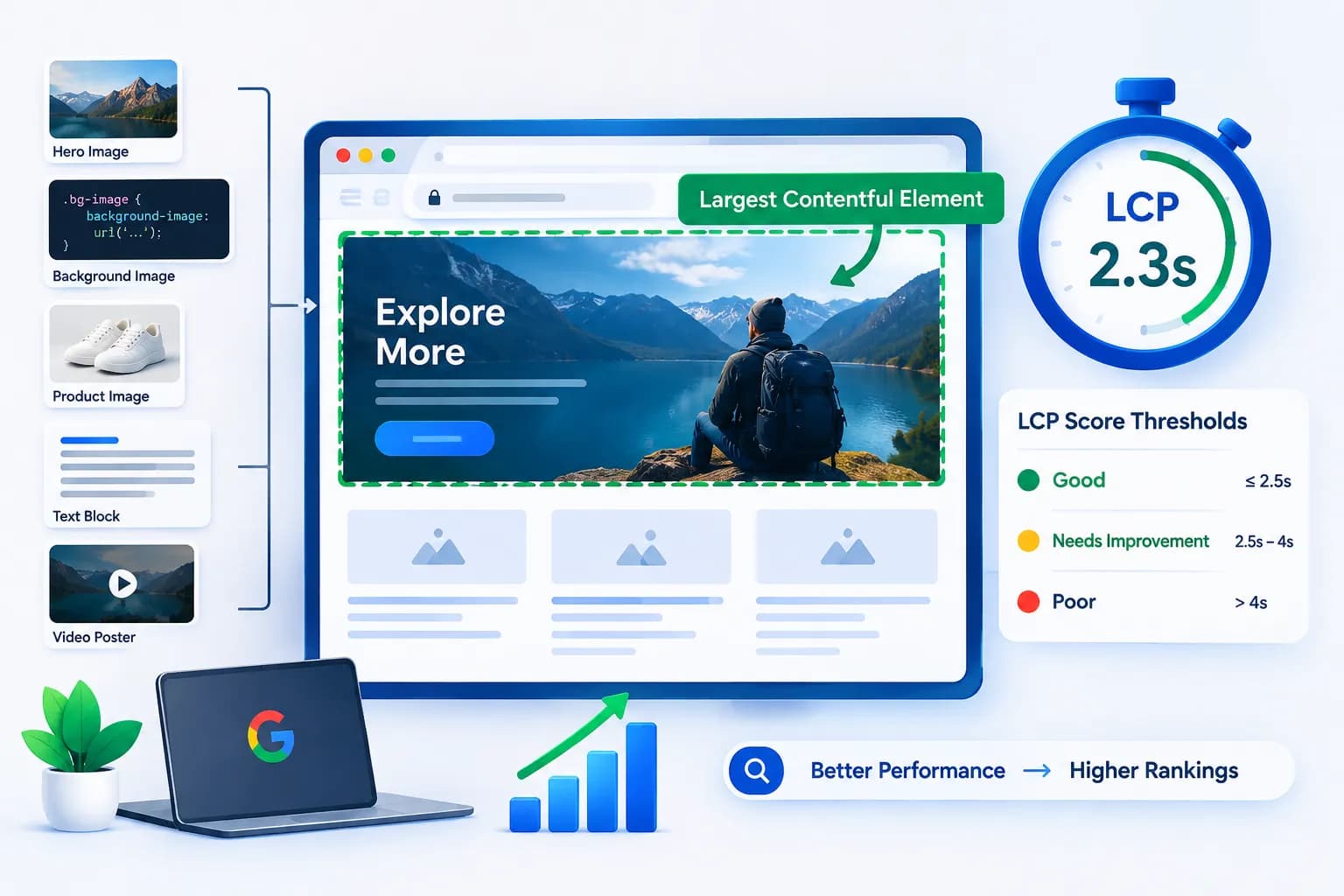
Largest Contentful Paint is the time at which the most important content element in the viewport completes its load. Generally speaking, this element is an image, a large block of text, a CSS defined background image, or a thumbnail of a video. The way to think about LCP is that it is not the point at which the browser starts loading and waiting for content in the background, it is about the point at which the user sees something meaningful. As a result, users evaluate the speed of load based on this factor.
What Does LCP Stand For?
LCP stands for Largest Contentful Paint. LCP describes the time it takes for the largest element on a page to load. The term “largest element” most likely refers to the element that contains the most content. “Contentful” in this context refers to the element not being empty with a background or foreground color, but rather being filled with actual content. LCP is the measurement of the time it take for the largest, most critical element of the page to load and render.
Why Google Introduced LCP as a Core Web Vital
To get rid of old, inaccurate speed metrics that don't provide accurate accounts of user experience, Google created LCP as part of Core Web Vitals. Many previous metrics, including page load time, would count every page resource, including ones that the user completely ignored while loading. Instead, LCP is concerned with how users perceive page speed. This is much more important when considering the user experience of a web page. Because of this, LCP, Cumulative Layout Shift, and Interaction to Next Paint, have all been incorporated into the ranking algorithm of search engines.
LCP as a Web Performance Metric
With the understanding of what LCP is, let's take a look at how this metric is measured in comparison to other performance metrics.
How LCP Is Measured (Render Time of the Largest Element)
LCP (largest contentful paint) measures the time needed to load the largest content on the screen. Browsers determine candidate elements. Once all elements on the page are interactive, the browser selects the largest element and records the time in seconds. The ensuing LCP measurement is the largest content element that appeared on the screen while the page was still loading.
What Counts as the "Largest Contentful Element" (images, hero images, background images, text blocks)
Several element types can be the largest contentful element (LCE). Some examples include:
- Hero images placed at the top of the page
- Background images added via CSS
- Product images found on an e-commerce page
- Large blocks of text such as a heading or an intro
- Images of video posters
If any hero image or large image placed lower down on the page takes a while to load, usually the LCP (largest contentful paint) element gets affected the most and so does your score, considering that the element takes time to load and renders.
.
LCP Score Thresholds (Good, Needs Improvement, Poor)
Google uses three tiers to define scores for LCP:
- Good: 2.5 seconds or faster
- Needs Improvement: between 2.5 and 4 seconds
- Poor: Anything over 4 seconds
When you achieve a good score for LCP, it means most real users can see the primary content of your page within 2.5 seconds of page navigation.
LCP vs First Contentful Paint (FCP) vs Cumulative Layout Shift (CLS)
Distinguishing Largest Contentful Paint (LCP) from other metrics can be difficult, so here’s a quick example to help. First Contentful Paint (FCP) is the measurement of when a screen first shows any content, like words or even a tiny icon. LCP is more focused around what is the largest element on screen. Cumulative Layout Shift (CLS) doesn’t deal with any load speed. Rather, it measures how much a page element moves around as the page loads. All of these metrics are important, but deal with different elements of the page.
Why LCP Matters for SEO and User Experience
Understanding LCP is only useful if you know why it actually affects your website's performance and visibility.
LCP's Role in Search Engine Rankings
Google has stated that Core Web Vitals and reasons related to LCP come into play with page experience ranking. In theory, a page ranked poorly due to slow LCP is not guaranteed. Page content relevance still matters. However, Page Experience will put your page in a ranking disadvantage compared to your competition's page that has a smoother experience.
Impact on Bounce Rates and Conversion Rates
Users leave websites with slow main content pages. Users do not wait for pages to load, especially for main content sections. A high bounce rate and low conversion rate is attributed to users that leave pages before your content loads. These users also never have the chance to see your offer, form, or product pages.
LCP and Real User Experience (Perceived Load Speed)
LCP (largest contentful paint) is designed to measure how fast a page feels loaded compared to when technical tasks are completed. Users often perceive a page has finished loading once they can read and see the main content even if background scripts continue running. LCP is designed to capture this perception, which is why it has a strong correlation with real user satisfaction.
How to Measure and Test Your LCP Score
Testing your LCP is straightforward once you know which tools to use and what to look for.
Using Google PageSpeed Insights
Google PageSpeed Insights is the best tool for checking LCP. Entering your URL will conduct lab data tests and Chrome User Experience Report (field data) tests. Google PageSpeed Insights will analyze your page and show you which element was recognized as the LCP element to help with issue resolution.
Using Chrome DevTools (Performance and Lighthouse Tabs)
Chrome DevTools has more advanced ways to inspect LCP. The Performance tab allows you to show a page load and identify when the largest element of the page loads. The Lighthouse tab can check your page similar to PageSpeed Insights. Chrome DevTools Performance tab is useful for developers so they can see what is causing the longest time to render the page.
Using Google Search Console's Core Web Vitals Report
For a site-wide perspective, Core Web Vitals data in Google Search Console group URLs by performance level. These include URLs that demonstrate good performance, need improvement, or show poor performance. Because this report is populated with real user data, not test data, this greatly helps identify performance patterns across multiple templates or pages compared to other methods of testing individual pages.
Free and Open-Source Site Audit Tools for LCP Testing
Using only Google’s tools is limiting. For free, there are several tool and browser extensions that can test LCP. Lighthouse CLI and WebPageTest are some examples. These tools can be used in an automated manner for development iterations if you want LCP checks to happen every time a deployment moves into a pipeline.
Common Causes of Slow LCP (LCP Issues to Watch For)
Most LCP issues trace back to a small handful of root causes.
Slow Server Response Times
Responses from your server outside of an acceptable threshold add latency to downstream performance metrics such as LCP. Of the various performance bottlenecks to consider, response time of the server is usually the first to check.
Render-Blocking Resources (CSS and JavaScript)
Implementing CSS and JavaScript files can make certain assets block rendering and, consequently, block the browser from even painting the content that is ready. Slow LCP performance is often caused by block rendering resources, like these.
Large, Unoptimized Images and Hero Images
Unoptimized hero images are usually the suspect. If an image is the LCP (largest contentful paint) element, the browser has to first download the image. If the hero image is unoptimized, it means the image is larger than needed and was never compressed.
Client-Side Rendering Delays
Pagess that rely on client-side rendering tend to have slow LCP scores. With client-side rendering, JavaScript builds the page content after the initial render. The browser must first run and execute the scripts before anything on the page is visible.
How to Improve LCP (Step-by-Step Optimization Guide)
Once you know what's causing a slow LCP score, improving it becomes a matter of addressing each issue systematically.
Optimize Server Response Time
- Use a Content Delivery Network (CDN): To distribute files across servers in closer proximity to your users, Content Delivery Networks (CDN) reduce the distance data has to travel to be displayed on your site. In many cases this can greatly optimize server response times, especially for your more remote users.
- Implement Server-Side Rendering: Server-side rendering generates HTML on the server, meaning essentially everything is loaded on the browser so it looks like content is populating much faster than client-side rendering where the JavaScript is required to build the page after it is downloaded.
- Apply Load Balancing Solutions: A load balancing solution is capable of distributing traffic to multiple systems. This ensures no single system becomes overloaded. With advanced configurations of load balancing solutions, response times can stay consistent even when the incoming traffic is increasing rapidly.
Eliminate Render-Blocking CSS and JavaScript
- Use Critical CSS: Critical CSS is used to define styles that are needed for above-the-fold content, and immediately load them, while deferring all other styles. This technique reduces the time to render first-paint by the browser and allows visible page content to be displayed.
- Defer Non-Critical JavaScript: Non-critical JavaScript, such as scripts for chat widgets or analytics, can be deferred or loaded asynchronously so they don't block the rendering of your main content.
Optimize Images and Media
- Compress and Resize Images: Optimizing images is one of the most consistent ways to address LCP. Reducing image sizes by compressing them, then displaying them in the size they need to be on the device, reduces file size without a noticeable impact on quality.
- Apply Dynamic Image Optimization: Dynamic image optimization automatically serves the right image format and size based on the user's browser and device, which helps reduce load times across a wide range of visitors.
- Avoid Lazy Loading for Above-the-Fold (LCP) Images: Lazy loading images below the page fold is optimal, but it can also negatively affect the LCP metric for your hero image or other page fold visuals. Because LCP stands for largest contentful paint, the LCP image should load immediately instead of waiting for a scroll event.
Improve Client-Side Performance
Reducing JavaScript execution time, minimizing third-party scripts, and breaking up large bundles all help the browser reach the LCP element faster when a page depends on client-side rendering.
Best Practices to Maintain a Good LCP Score
Improving LCP once isn't enough. Website performance tends to drift over time as new content, plugins, and scripts get added.
Regularly Auditing Site Performance
Running a site audit tool on a consistent schedule helps catch regressions early, before they affect a large portion of your traffic or search rankings.
Monitoring Core Web Vitals Over Time
Since LCP uses some real user data, it's best to monitor your Web Vitals report over weeks and months instead of just one test. In this case, the data points matter less than the trends that you see.
Common Mistakes That Hurt LCP (and How to Avoid Them)
Many beginners make lazy loading hero images, skip image compression, overuse client-side rendering, and ignore back-end response times. All of these issues will typically drive your LCP score into the poor ranges.
Conclusion
LCP measures how quickly the main content of a page becomes visible to a real user, and it plays a direct role in both search engine rankings and overall user experience. A good LCP score typically comes down to a handful of factors: fast server response, minimal render-blocking resources, and well-optimized images. By testing your pages regularly with tools like Google PageSpeed Insights or Chrome DevTools, and addressing issues as they appear, you can keep your site performance strong and give users the fast, smooth experience they expect.
What is a good LCP score?
A good LCP score is 2.5 seconds or faster. Scores between 2.5 and 4 seconds need improvement, and anything above 4 seconds is considered poor.
What is the difference between LCP and FCP?
First Contentful Paint (FCP) measures when any content first appears on the page, while LCP measures when the largest content element finishes rendering.
How do I fix LCP issues on my website?
Start by optimizing server response time, removing render-blocking CSS and JavaScript, compressing images, and avoiding lazy loading on above-the-fold visuals.
Why does Google PageSpeed Insights show a different LCP element than expected?
The browser identifies the largest visible element at the time of measurement, which can change if your layout shifts or if a different image loads larger than anticipated.
Can lazy loading hurt my LCP score?
Yes. Applying lazy loading to your hero image or other above-the-fold content can delay when it starts loading, which pushes your LCP score higher.
Does a CDN really improve LCP?
Yes. A content delivery network reduces the physical distance between your server and the user, which lowers server response time and helps content render faster.
What does "no valid LCP element" mean in PageSpeed Insights?
This message appears when the page doesn't display any content that qualifies as a largest contentful element, often due to rendering errors or a blank viewport during testing. Re-running the test after fixing rendering issues usually resolves it.