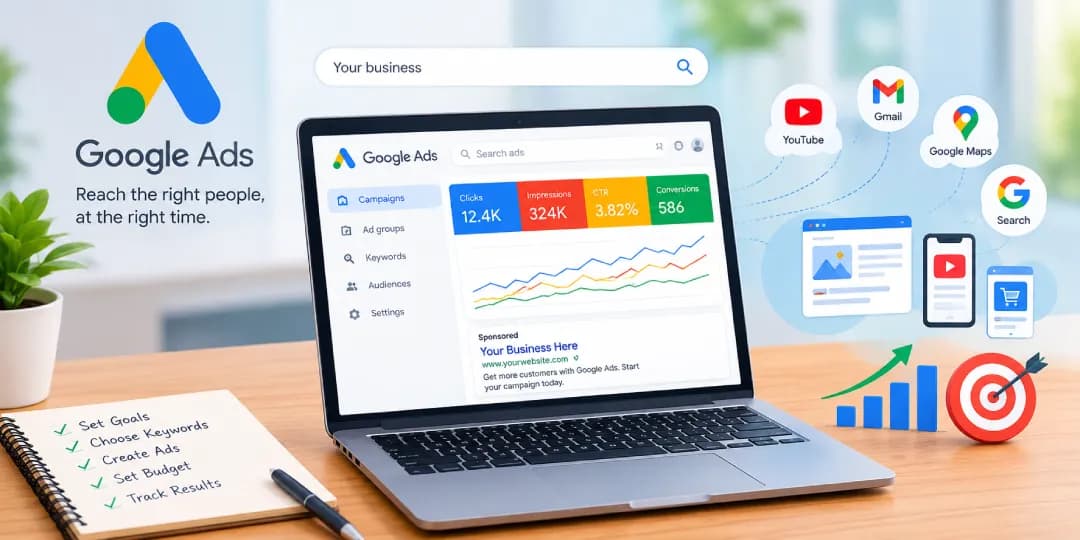
Google Ads is Google’s online advertising platform. It lets businesses pay to show ads on Google Search, YouTube, Gmail, Google Maps, and millions of partner websites and apps. On the search side, advertisers choose keywords, set a budget, and bid for placement, and they usually pay only when someone clicks. The result is a way to reach people at the moment they search for what you sell. This guide covers what Google Ads is, how it works, what it costs, and how to start.
Table of contents17 sections
What Are Google Ads? (Definition and Overview)
Google Ads is a pay-per-click (PPC) advertising system. Advertisers create campaigns, pick the audience they want, and Google decides when to show each ad. It is one of the most widely used forms of google advertising, and it is built around intent. A person typing “emergency plumber near me” is ready to buy, and Google Ads puts your business in front of them.
Google Ads Explained in Simple Terms
Think of it as a live auction that runs every time someone searches. You tell Google which searches matter to you, write a short ad, and set how much you will pay. Google compares your ad with competing ads and shows the best match. If the searcher clicks, you pay. If not, you generally pay nothing for that appearance.
Google Ads vs. Google AdWords (Name Change and History)
Google AdWords launched in 2000, and Google renamed it Google Ads in 2018\. The new name reflected a platform that had grown well beyond text ads on search results to cover video, apps, shopping, and display. Plenty of people still search for “adwords login” or “google adwords,” and the old terms still describe the same product. Today you sign in at ads.google.com.
Who Uses Google Ads? (Businesses, Marketers, Agencies)
Local shops, ecommerce brands, software companies, and large enterprises all use it. In-house marketers run their own accounts, and many businesses hire a google ads agency or a management company for ongoing help. Agencies usually work through a manager account (formerly called MCC), which lets them handle many client accounts from one login.
What Are Google Ads Used For?
Most advertisers use it to get website visits, phone calls, form submissions, online sales, store visits, or app installs. Others use it to build awareness for a new brand or product. You pick a goal first, and the campaign settings follow from it.
Google Ads vs. Google AdSense
They are two sides of the same system. Google Ads is for advertisers who pay to show ads. Google AdSense is for website owners and publishers who earn money by displaying those ads on their sites. If you want to promote your business, you want Google Ads.
Google Ads vs. Search Engine Advertising (SEA)
Search engine advertising (SEA) is the general term for paid ads on search engines. Google Ads is the biggest platform for it, but Microsoft Advertising does something similar on Bing. Google Ads also goes beyond SEA, since it covers video, display, and app placements.
How to Recognize Google Ads in Search Results
Look for the “Sponsored” label above or below the organic listings. Ads look much like normal results, with a headline, a URL, and a short description, but they carry that label. Shopping ads appear as product images with prices.
How Does Google Ads Work?
Google Ads works through an auction. You choose keywords, write ads, and set bids. When a search matches your targeting, Google runs an auction in a fraction of a second and decides which ads appear and in what order. Bid size matters, but so does ad quality.
The Google Ads Auction System
The auction happens every time a search triggers ads. Nobody wins by outspending everyone else, which is why a small business can still compete with a larger one.
How the Google Ads Auction Works Step by Step
First, a person searches. Second, Google finds ads whose keywords match that search. Third, it checks which ads are eligible. Fourth, it calculates an Ad Rank for each one. Finally, the ads with the highest scores appear in order, and the advertiser pays only if there is a click. Placement is decided in this step, based on Ad Rank, so it is not a separate process.
How Google Determines Which Ads Are Eligible
An ad is eligible if its keywords match the search, its targeting fits the user (location, device, audience), the budget has not run out, and the ad follows Google’s policies. Ads that are disapproved or limited by policy do not enter the auction.
Ad Rank and Quality Score Explained
These two ideas explain why one advertiser pays less than another for the same click.
What Is Ad Rank and How Is It Determined?
Ad Rank decides your position. It combines your bid, the quality of your ad and landing page, the expected impact of your assets (like sitelinks), and the context of the search, such as device and location. A high bid with a poor ad can lose to a lower bid with a relevant one.
What Is Google Ads Quality Score?
Quality Score is a 1 to 10 rating shown at the keyword level. It is a diagnostic tool that tells you how your ads compare with others. It is not used directly in the auction, but the things behind it feed into Ad Rank.
Factors That Affect Quality Score
Three things drive it. Expected click-through rate is how likely people are to click your ad. Ad relevance is how closely the ad matches the search. Landing page experience is how useful and fast your page is. Fixing any of these usually improves results.
Pay-Per-Click (PPC) Model — Cost Per Click Basics
In the PPC model you pay when someone clicks, not when your ad appears. Your cost per click (CPC) is the amount actually charged, which is often lower than your maximum bid. A google ppc ad can cost a dollar or less in some industries and far more in competitive ones like legal or insurance.
Keywords and Keyword Match Types
Keywords tell Google which searches should trigger your ads. Match types control how closely a search must resemble the keyword.
Broad Match Keywords
Broad match shows your ad for a wide range of related searches, including ones that do not contain your exact words. It gives the most reach, but it needs close monitoring and works best alongside smart bidding.
Phrase Match Keywords
Phrase match shows your ad when the search includes the meaning of your phrase, sometimes with extra words before or after. It balances reach and control.
Exact Match Keywords
Exact match targets searches with the same meaning or intent as your keyword. It gives the most control, though it also limits reach.
Negative Keywords
Negative keywords block searches you do not want. A company selling premium software might add “free” as a negative keyword, for example. This keeps your budget away from people who will never buy.
How Search Intent and Ad Relevance Affect Google Ads
Someone searching “buy running shoes” is in a different place than someone searching “how to choose running shoes.” Your ad copy and landing page should match what that person wants. When they do, click-through rate rises, quality improves, and costs tend to fall.
How Google Ads Uses AI and Machine Learning
Google uses machine learning for bidding, audience matching, ad assembly, and keyword expansion. Smart Bidding adjusts bids in real time using signals like device, time of day, and location. Newer tools, including Performance Max and AI-driven features inside Search campaigns, automate more of the process. This saves time, although it also means you give up some control.
Where Google Ads Appear
Google Ads appear across Google’s own properties and a large network of partner sites. Where yours show depends on the campaign type you choose.
Google Search Results and Search Engine Results Pages
This is the best-known placement. Text ads appear on results pages when someone searches, usually at the top and bottom of the page.
Google Display Network
The Google Display Network is a large group of websites, blogs, and apps that show banner and image ads. It suits awareness and retargeting more than direct sales.
Google Shopping Results
Shopping ads display product photos, prices, and store names in a dedicated section of the results page. They pull data from a product feed.
YouTube and Video Ads
Video ads can play before, during, or after other videos, or appear in YouTube search and the home feed. This is where “google ads for youtube” lives.
Gmail and App Placements
Ads can appear in Gmail promotions tabs and inside mobile apps through Google’s partner network. These placements are usually part of Demand Gen, Display, or app-related campaigns.
Google Maps and Local Search Advertising
Promoted pins and local search ads help nearby customers find you on Google Maps. Businesses with a Google Business Profile can connect it to ads through location assets.
Google Discover and Other Google Advertising Placements
Ads can also appear in the Discover feed on mobile devices, and in some other Google surfaces, mostly through Demand Gen and Performance Max.
Google Ads in AI Overviews and AI Mode
Google has been testing and expanding ads inside AI Overviews and AI Mode, where eligible campaigns can appear alongside AI-generated answers. Availability and eligibility have been changing, so check Google’s Help Center for the current rules.
Types of Google Ads Campaigns
Each campaign type reaches people in a different way and suits a different goal. Choosing the right one early saves a lot of wasted spend.
Search Ads
Search ads are text ads on results pages. They are the most direct way to catch buying intent.
How Search Ads Work and When to Use Them
You pick keywords, write headlines and descriptions, and bid. They work well when people already search for what you offer, such as services, local solutions, or specific products.
Display Ads
Display ads are visual ads on websites and apps across the Display Network.
How Display Ads Work and When to Use Them
Google matches your ads to sites and audiences based on targeting. They suit brand awareness and remarketing, but they generally convert less directly than search.
Shopping Ads
Shopping ads showcase products visually with price and merchant details.
How Google Shopping Ads Work
Google reads your product data and matches items to relevant searches. You bid on products or groups of products, and the best-matched listings appear.
Google Merchant Center and Product Feeds
Google Merchant Center is where you upload your product feed, including titles, prices, images, and availability. Accurate, complete feeds matter a great deal here, because errors can block products from showing.
Video Ads
Video campaigns run mainly on YouTube and partner sites.
YouTube Video Ad Formats and Uses
Common formats include skippable in-stream ads, non-skippable in-stream ads, in-feed video ads, and Shorts ads. They work for storytelling, product demonstrations, and reaching people who are not yet searching.
Performance Max Campaigns
Performance Max is an automated campaign type that runs across all of Google’s channels from one campaign.
How Performance Max Campaigns Work
You supply creative assets, audience signals, and conversion goals. Google’s AI then builds combinations of ads and decides where to show them across Search, YouTube, Display, Gmail, Maps, and Discover.
Benefits and Limitations of Performance Max
It can find conversions you might miss and saves setup time. However, reporting is less detailed than with traditional campaigns, and you have less control over exact placements.
App Campaigns
App campaigns promote mobile apps across Google’s networks with very little manual setup.
App Installs and App Engagement
You can optimize for installs or for actions inside the app, such as sign-ups or purchases. Google builds the ads from the text, images, and videos you provide.
Demand Gen Campaigns
Demand Gen campaigns are designed to create interest and drive action on visual, entertainment-heavy surfaces like YouTube, Discover, and Gmail. They replaced the older Discovery campaigns.
How Demand Gen Campaigns Work
You provide images, videos, and copy, then target audiences using signals like interests and customer lists. Google uses AI to decide who sees which creative.
Demand Gen vs. Display Campaigns
Display is broader and works across a huge network of sites. Demand Gen is more focused on visual discovery and engagement on specific Google properties, and it usually relies more heavily on strong creative.
Local Services Ads
Local Services Ads are a related but separate Google advertising product built for service businesses like plumbers, electricians, and lawyers. They appear at the top of results with a “Google Guaranteed” or “Google Screened” badge, depending on the category. People searching for the google lsa login or google guaranteed login are looking for the Local Services Ads dashboard, which is not the same as the standard Google Ads account.
How Local Services Ads Differ From Standard Google Ads
You pay per lead rather than per click, you do not choose keywords, and your business must pass background and license checks. The setup is simpler, but you have less control over targeting.
How to Choose the Right Google Ads Campaign Type
Start with your goal. If you want sales or leads from people already searching, begin with Search. If you sell products online, use Shopping or Performance Max. If you want awareness, try Video or Demand Gen. For local service businesses, consider Local Services Ads. The table below compares the options.
| Campaign Type | Best For | Where It Appears | Control Level |
|---|---|---|---|
| Search | Leads and sales from active searchers | Google Search results | High |
| Display | Awareness and remarketing | Websites and apps | Medium |
| Shopping | Selling products online | Search results and Shopping tab | Medium |
| Video | Awareness and engagement | YouTube and partner sites | Medium |
| Performance Max | Conversions across all channels | All Google channels | Low |
| App | App installs and engagement | Search, Play, YouTube, Display | Low |
| Demand Gen | Visual discovery and demand creation | YouTube, Discover, Gmail | Medium |
| Local Services Ads | Local service leads | Top of search, Maps | Low |
Key Components of a Google Ads Account
A Google Ads account has a clear structure. Understanding it makes everything else easier to manage.
Campaigns, Ad Groups, and Ad Copy Structure
A google ads campaign sits at the top and holds your budget and settings. Inside each campaign are ad groups, which contain related keywords and ads. The ad copy itself is the headline and description people read. Tight ad groups, where every keyword fits one theme, usually perform better than broad ones.
Landing Pages and Landing Page Experience
The landing page is where people go after clicking. It is one of the biggest factors in whether the click turns into a customer.
Landing Page Relevance and User Experience
The page should match the promise in the ad, load quickly, work well on phones, and make the next step obvious. A mismatch between ad and page is one of the most common reasons campaigns underperform.
Ad Extensions and Assets That Boost Visibility
Ad extensions are now called assets. They add extra information and make ads larger and more useful.
Sitelinks, Callouts, Calls, and Location Assets
Sitelinks link to specific pages, callouts highlight selling points like “free shipping,” call assets add a phone number, and location assets show your address. Using several together usually improves click-through rate.
Responsive Search Ads and Ad Assets
Responsive search ads let you enter multiple headlines and descriptions. Google tests combinations and learns which work best. Provide varied, useful options rather than near-duplicates.
Target Audience and Audience Targeting Options
Good targeting helps you spend money on the right people.
Demographic and Interest-Based Targeting
You can narrow by age, gender, household income in some regions, and interests. This works best for awareness campaigns and as a layer on top of keywords.
Location and Geographic Targeting
You can target countries, cities, radius areas, or exclude places entirely. For local businesses, accurate location settings are essential.
Audience Segments and Custom Audiences
Segments include in-market audiences, affinity groups, and custom segments based on search terms or websites people visit. Customer Match lets you upload your own contact lists.
Remarketing and Retargeting Audiences
Remarketing shows ads to people who have already visited your site or interacted with your business. These visitors already know you, so they often convert at a better rate.
Google Ads Account Settings and Administration
Account settings cover billing, time zone, currency, user access, and linked accounts like Google Analytics. Your customer ID appears at the top of the account and is useful when working with support or an agency.
Why Businesses Use Google Ads
Businesses use it because it connects them with ready-to-buy customers quickly and gives them measurable results.
Driving Website Traffic and Potential Customers
Ads put your site in front of people actively searching, which brings relevant visitors rather than random ones.
Building Brand Awareness
Even when people do not click, they see your name. Display and video campaigns are especially good for this.
Generating Leads, Sales, and Conversions
With conversion tracking set up, you can see exactly which ads produce calls, form fills, or purchases. That makes google leads easier to measure.
Real-Time Performance Tracking (with Google Analytics)
Data updates quickly, and linking Google Analytics adds detail about what visitors do after the click.
Advantages Over Organic Search (Speed vs. SEO)
SEO can take months to build momentum. Google Ads can put you on the first page within hours of launch. They work best together, since paid traffic can cover gaps while organic rankings grow.
Precise Audience Targeting and Campaign Control
You control location, device, schedule, audience, and budget. You can pause or adjust at any time. Remarketing is a major benefit here, though the details come later.
Flexibility and Scalability for Different Business Sizes
You can start with a small daily budget and scale up as results improve. This works for a local shop and a global brand alike.
Is Google Ads Worth It for Small Businesses?
Often yes, if you have a clear offer, a decent website, and tracking in place. A google ads for small business strategy should start narrow, with a few high-intent keywords and a local focus. However, if margins are thin and competition is intense, the numbers may not work.
Advantages and Disadvantages of Google Ads
Key Advantages of Google Ads
In short, it is fast, measurable, flexible, and targeted. You reach people with real intent, you control your spending, and you can see what works.
Disadvantages and Limitations of Google Ads
It is not right for everyone, and it helps to know the downsides before spending money.
High Competition and Rising Advertising Costs
Popular keywords attract many bidders, which pushes prices up. Industries like legal, finance, and software can see very high costs per click.
Dependence on Paid Traffic
When you stop paying, the traffic stops. Relying only on ads makes your business vulnerable to cost changes.
Ad Fatigue and Ad Blockers
People can grow tired of seeing the same ad, and some use ad blockers that hide ads entirely. Rotating creative helps with the first problem, but the second is outside your control.
Learning Curve and Campaign Management Complexity
The platform has many settings, and mistakes can be expensive. This is one reason many companies use google ads management services or a google ads company to run their campaigns.
When Google Ads May Not Be the Right Choice
It may not suit you if nobody searches for what you offer, if your budget is extremely small, if your website cannot convert visitors, or if you cannot track results.
How Much Does Google Ads Cost?
There is no fixed price. It is free to set up an account, and you decide how much to spend. Your cost depends on your industry, keywords, competition, and quality. Be cautious about advertised coupons or promo codes, since offers vary by region and eligibility, and Google’s own promotions are the only ones worth trusting.
Understanding Cost Per Click (CPC) and Maximum Bid
Your maximum bid is the most you will pay for a click. Your actual CPC is usually lower, because the auction charges just enough to beat the next advertiser. Average CPCs vary widely, so industry benchmarks are only a rough guide.
Factors That Influence Google Ads Cost
Competition, Quality Score, ad relevance, landing page experience, location, device, and time of day all affect price. Better quality generally means lower costs.
Google Ads Pricing Models Explained
Not every model is available in every campaign type. The campaign you choose determines how you pay.
Cost Per Click (CPC)
You pay when someone clicks. This is standard for Search and Shopping campaigns.
Cost Per Mille (CPM)
You pay per thousand impressions. It is common in Display and Video campaigns aimed at awareness.
Cost Per Action or Acquisition (CPA)
You set a target cost for each conversion. In most Google Ads setups this is a bidding goal, so you still pay per click while Google aims to hit your target.
Cost Per View (CPV)
You pay when someone watches a video ad for a set time or interacts with it. It applies to certain YouTube formats.
Cost Per Engagement (CPE)
You pay when users take a specific engagement action. It is available only for limited ad formats and is less common today.
Setting a Budget for Your First Campaign
Start small. A modest daily budget lets you collect data without a large commitment. Many beginners begin with a budget they can afford to lose while they learn.
How to Calculate Your Google Ads Budget
Start with your goal. If you want 10 sales a month and expect a 2 percent conversion rate, you need 500 clicks. Multiply by your expected CPC to estimate the monthly budget, then divide by 30 for the daily figure.
How to Reduce Google Ads Costs Without Losing Results
Add negative keywords, improve Quality Score, narrow your location, pause poor performers, and use ad scheduling. Small improvements in click-through rate often lower costs.
Understanding Google Ads Billing and Payments
You can pay with automatic payments, where Google charges after you spend or reach a threshold, or with manual payments, where you add funds first. Some businesses qualify for monthly invoicing. Charges may also appear in increments as spend builds up.
Google Ads Bidding Strategies Explained
Bidding strategy tells Google how to spend your budget. The right choice depends on your goal and how much conversion data you have.
Manual CPC Bidding
You set your own bid for each keyword or ad group. It gives full control and works well for new accounts or small tests.
Automated Bidding and Smart Bidding
Automated bidding uses machine learning to set bids for each auction. It needs conversion data to work well.
Maximize Clicks
Google tries to get as many clicks as possible within your budget. It suits traffic goals but does not guarantee quality.
Maximize Conversions
Google aims for the most conversions within your budget. It works best once you have reliable tracking.
Maximize Conversion Value
Google aims for the highest total conversion value, which suits ecommerce where order sizes differ.
Target CPA
You set the average cost you want per conversion, and Google adjusts bids to reach it.
Target ROAS
You set the return you want for each dollar spent, and Google bids accordingly. It needs conversion values to be tracked.
How Google Ads AI Optimizes Bids
The system looks at signals such as device, location, time, audience, and past behavior, then adjusts bids in real time. It often catches patterns that manual management would miss.
How to Choose the Right Bidding Strategy
New campaigns usually do best with Maximize Clicks or Manual CPC to gather data. Once you have steady conversions, move to Maximize Conversions, Target CPA, or Target ROAS.
Common Bidding Mistakes to Avoid
Setting targets that are too aggressive, changing strategies too often, switching to automation before there is enough data, and ignoring budget limits are common errors.
How to Get Started with Google Ads
Getting started is easier than it looks. Take it one step at a time.
Creating a Google Ads Account
Go to ads.google.com and sign in with a Google account. This is the usual google ads login. If you already use Gmail, you can use the same account, though a dedicated business account is cleaner. Never buy google ads accounts from third parties. It violates Google’s policies and can lead to suspension.
Business Information and Account Settings
Enter your business name, website, country, time zone, and currency. Choose these carefully, because currency and time zone are difficult to change later.
Billing Information and Payment Setup
Add a payment method and choose how you will pay. Check your billing details before launching to avoid interruptions.
Define Your Advertising Goals and Objectives
Decide what success means. More calls, more sales, more sign-ups, or more awareness each require a different setup.
Basic Keyword Research for Your First Campaign
Keywords set the direction of a search campaign, so spend time on them before launching.
How to Use Google Keyword Planner
Keyword Planner is a free tool inside your account. Enter a product or website, and it shows related keywords, search volume ranges, and estimated bid costs.
How to Choose Relevant Keywords
Choose terms that match what your customers actually type. Prefer specific phrases, like “emergency plumber in Lahore,” over broad words like “plumber.” Commercial intent matters more than volume.
How to Analyze Keyword Competition
Look at the competition level and suggested bid in Keyword Planner. Higher bids usually mean stronger competition, so a few lower-cost long-tail keywords can be a smart starting point.
Setting Up Your First Ad Campaign (Step-by-Step Overview)
Here is the general flow Google walks you through.
Select a Campaign Objective
Choose a goal such as sales, leads, or website traffic. Google tailors the options to match.
Choose Your Campaign Type
Pick Search, Shopping, Performance Max, or another type based on your goal.
Define Location and Audience Targeting
Choose where your customers are and, if needed, add audience layers.
Set Your Daily Budget and Bidding Strategy
Enter a daily budget and select a bidding strategy that matches your data level.
Create Ad Groups and Select Keywords
Group similar keywords together and match each group with its own ads.
Write Headlines and Descriptions
Use clear, benefit-focused text that reflects what people are searching for.
Add Ad Assets and Extensions
Add sitelinks, callouts, and call or location assets to take up more space and give more reasons to click.
Choose or Create a Landing Page
Send people to the page that best matches the ad, not simply your home page.
Review and Launch Your Campaign
Check targeting, budget, and tracking, then publish. Google reviews ads for policy compliance before they run.
What Happens After Launching a Google Ads Campaign?
Ads usually go through a short review. Then the learning period begins, when Google gathers data and adjusts delivery. Early numbers can look uneven. Avoid making big changes in the first few days.
Common Mistakes Beginners Should Avoid
Typical mistakes include using only broad match without negative keywords, sending traffic to a weak page, skipping conversion tracking, and checking results too soon. Setting a budget too low to gather useful data is another frequent problem.
How to Create Effective Google Ads Campaigns
Good campaigns come from small, careful decisions rather than clever tricks.
How to Write Effective Google Ads Copy
Writing Compelling Headlines
Put the main keyword or benefit near the start. Be specific. “Same-Day AC Repair” beats “Quality Service.”
Creating Clear Calls to Action
Tell people what to do next, such as “Get a Free Quote” or “Shop Now.” Make the next step obvious.
Matching Ad Copy With Search Intent
If people search for a price, mention price. If they want a solution fast, mention speed. The closer your message is to their question, the better your ad performs.
How to Build High-Converting Landing Pages
Keep one clear goal per page. Use a strong headline, short forms, trust signals like reviews, and fast loading. Make sure the mobile experience is smooth.
How to Use Negative Keywords Effectively
Review the search terms report regularly and add irrelevant queries as negatives. Start with common ones such as “free,” “jobs,” and “DIY” if they do not fit your offer.
How to Set Up Remarketing Campaigns
Create audience lists from your site visitors, link them to your campaigns, and show tailored ads. Set sensible time windows and exclude people who have already converted.
How to Use Ad Scheduling
If your business only takes calls during certain hours, or conversions peak on certain days, schedule ads accordingly. Check performance data first before limiting hours.
How to Research Competitors’ Google Ads
Studying competitors can reveal what works in your market.
Finding Competitors’ Paid Keywords
Third-party SEO tools show which keywords competitors bid on. Auction Insights in your account also shows who competes with you most often.
Analyzing Competitor Ad Copy and Advertising History
The Google Ads Transparency Center lets you see ads a company is running. Use it to understand their messaging, offers, and formats, and not to copy them.
Google Ads Strategy for SaaS Businesses
SaaS companies often rely on high-intent keywords like “software for $problem$,” free trial offers, and strong retargeting, since buying decisions take time.
Google Ads Strategy for Local Businesses
Focus on tight location targeting, call assets, location assets, and a connected Business Profile. Consider Local Services Ads if your category is eligible.
Google Ads Strategy for Ecommerce Businesses
Use Shopping and Performance Max campaigns with a clean product feed. Track conversion value and use remarketing to bring back abandoned carts.
How to Track and Measure Google Ads Performance
You cannot improve what you do not measure. Set up tracking before you spend heavily.
Key Google Ads Performance Metrics
Click-Through Rate (CTR)
CTR is clicks divided by impressions. A “good” CTR varies by industry, and search ads often land around a few percent or higher, so compare against your own history.
Cost Per Click (CPC)
This shows how much each click costs on average. Lower is not always better if the clicks do not convert.
Conversion Rate
This is the percentage of clicks that become conversions. Typical rates vary widely, so focus on improving your own baseline.
Cost Per Acquisition (CPA)
CPA tells you what each lead or sale costs. Compare it against your profit per customer.
Return on Ad Spend (ROAS)
ROAS is revenue divided by ad spend. A ROAS of 4 means four dollars of revenue for every dollar spent. A good target depends on your margins.
Impressions and Impression Share
Impressions show how often your ad appeared. Impression share shows the percentage of possible impressions you actually received, which helps reveal missed opportunity.
How to Set Up Google Ads Conversion Tracking
Google Ads Conversion Actions and Conversion ID
Create a conversion action in your account for each goal, such as purchases or form submissions. Google gives you a tag with a conversion ID and label to install on your site. Auto-tagging adds a gclid parameter to your URLs, which links clicks to results.
Google Analytics 4 Integration
Link your Google Ads account to GA4 to import conversions and view behavior data. It gives a fuller picture of the journey after the click.
Google Tag Manager Setup
Tag Manager lets you add tracking tags without editing site code directly, which makes updates much easier.
Tracking Google Ads in WordPress
Conversion Tracking Without Coding
Plugins such as Site Kit or tag manager integrations allow you to add tracking from a dashboard without touching code.
Ecommerce and File Download Tracking
WooCommerce integrations can send purchase data, and tag triggers can record file downloads as conversions.
How to Analyze Google Ads Reports
Check the campaign, keyword, search terms, and device reports. Look for patterns, such as which keywords produce results and which waste money. A custom google ads report can help you compare periods.
How to Measure Google Ads ROI
Subtract ad spend and costs from revenue, then divide by ad spend. Include lifetime customer value if repeat purchases matter.
How to Optimize Google Ads Campaigns for Better Results
Optimization is ongoing. A few focused habits are more effective than constant tinkering.
Improve Ad Relevance and Quality Score
Align keywords, ads, and landing pages tightly. Test new headlines that reflect real search wording.
Optimize Keyword Match Types and Search Terms
Review the search terms report weekly. Add strong terms as keywords and remove poor ones.
Use A/B Testing for Ad Copy and Landing Pages
Change one element at a time, such as the headline or the call to action, and let the test run long enough to be meaningful.
Adjust Bids Based on Campaign Performance
Raise bids on profitable segments and lower them where results are weak. Do this gradually.
Improve Audience Targeting
Add observation audiences to learn who converts, then apply bid adjustments or narrow targeting accordingly.
Reduce Wasted Ad Spend With Negative Keywords
Keep updating your negative list as new irrelevant searches appear.
Optimize Ads for Mobile Users
Check page speed on phones, use call assets, and make buttons easy to tap.
Use Remarketing to Improve Conversions
Show past visitors a clear next step or a limited-time offer to bring them back.
Monitor Campaign Learning and Performance Trends
Watch for trends over weeks, not hours. Sudden changes often require investigation, but daily swings are normal.
When to Scale, Pause, or Stop a Google Ads Campaign
Scale when CPA or ROAS meets your goals consistently. Pause when results drift off target and you need to fix something. Stop when you cannot reach profitability after real testing.
Google Ads Learning Resources
There is plenty of help available, and much of it is free.
Official Google Ads Guides and Help Center
The Google Ads Help Center covers settings, policies, and troubleshooting. It is the most reliable source for current information.
Tutorials and Courses for Beginners
Skillshop, YouTube tutorials, and reputable marketing blogs offer google ads training for beginners. A google ads guide that includes real account walkthroughs is especially useful.
When to Manage Ads Yourself vs. Hiring a Google Ads Agency
Manage it yourself if your budget is small and you have time to learn. Hire a google ads agency or management service when spend grows, your account becomes complex, or results stall. Ask any agency about their reporting and fees before signing.
Google Ads Keyword Planner
Keyword Planner is available inside your account for research. Step-by-step use is covered in the setup section above.
Google Ads Performance Grader and Account Auditing Tools
Performance Grader is a third-party tool from WordStream that reviews an account against benchmarks. Treat the results as suggestions, not verdicts.
Google Ads Editor and Campaign Management Tools
Google Ads Editor is a free desktop app for making bulk changes offline. It is helpful for larger accounts.
Google Ads Certifications and Skillshop
Google offers free certifications through Skillshop. They show competence, although they do not replace real account experience.
Managing and Closing a Google Ads Account
How to Pause or Stop Google Ads Campaigns
Open the Campaigns page, select the campaign, and change its status to Paused. You can resume it later.
How to Cancel a Google Ads Account
In the Admin or Settings area, find Account settings and choose Cancel account. Pause campaigns and settle any outstanding balance first.
What Happens to Your Data and Billing After Cancellation?
Ads stop running immediately, and you remain responsible for any costs already incurred. Historical data may still be accessible for a period, so export reports you want to keep before closing the account.
Conclusion
Google Ads gives businesses a direct line to people who are already searching for what they offer. Learning how the auction, Quality Score, keywords, and bidding work will help you spend wisely. Start with one clear goal, a small budget, and proper tracking. Then improve slowly based on real data. If you stay patient and keep testing, Google Ads can become one of the most reliable ways to grow a business online.
Frequently Asked Questions About Google Ads
What is Google Ads used for?
It is used to promote businesses through paid ads on Search, YouTube, Maps, Gmail, and partner sites in order to get traffic, leads, sales, or awareness.
How is Google Ads different from Google AdWords?
They are the same platform. AdWords was renamed Google Ads in 2018 as it expanded beyond search ads.
How does the Google Ads auction work?
Each time a search triggers ads, Google ranks eligible ads using bid, quality, asset impact, and context. The highest Ad Rank wins the best position.
Is Google Ads worth it for small businesses?
It can be, if you target specific, high-intent searches and track results. Without a clear offer or a working website, the return may be weak.
How much do Google Ads cost per click?
It varies by industry and competition. Some clicks cost under a dollar, while competitive categories can cost much more.
Can I run Google Ads without a big budget?
Yes. You set a daily budget, and you can begin small while you collect data.
What’s the difference between Google Ads and SEO?
Google Ads is paid and delivers results quickly, while SEO earns organic rankings over time without per-click charges.
Do I need an agency to run Google Ads, or can I do it myself?
You can do it yourself, especially at low spend. An agency helps when accounts grow complex or time is limited.
What is Quality Score in Google Ads?
It is a 1 to 10 diagnostic rating of expected CTR, ad relevance, and landing page experience for a keyword.
How long does it take for Google Ads to work?
Ads can show within hours, but it usually takes a few weeks to collect enough data to judge performance.
What is a good click-through rate for Google Ads?
It depends on the industry and campaign type. Compare against your own results and similar businesses.
How do you measure Google Ads success?
Track conversions, CPA, ROAS, and ROI, and compare them with your business goals.
How does Google Ads remarketing work?
It shows ads to people who visited your site or interacted with your business before, using audience lists.
What are Google Ads bidding strategies?
They are methods for setting bids, including Manual CPC, Maximize Clicks, Maximize Conversions, Target CPA, and Target ROAS.
What is the difference between CPC, CPM, CPA and CPV?
CPC is cost per click, CPM is per thousand impressions, CPA is per conversion, and CPV is per video view. Availability depends on campaign type.
What are Performance Max campaigns in Google Ads?
They are automated campaigns that run across all Google channels using your assets and goals.
What are Demand Gen campaigns?
They are visual campaigns that create interest across YouTube, Discover, and Gmail.
How does Google Ads use AI and automation?
It uses machine learning for bidding, targeting, creative combinations, and campaign automation.
How can I improve my Google Ads Quality Score?
Improve ad relevance, write clearer ads, and build faster, more relevant landing pages
How do I track conversions in Google Ads?
Create conversion actions, install the tag or use Tag Manager, and link Google Analytics 4.
How do I choose the right Google Ads campaign type?
Match the type to your goal. Search suits intent, Shopping suits products, Video suits awareness, and Performance Max suits broad conversion goals.
How can I reduce wasted spending on Google Ads?
Use negative keywords, tighten targeting, improve quality, and review search terms regularly.
What is the difference between Google Ads and Google AdSense?
Google Ads is for advertisers who pay, and AdSense is for publishers who earn from displaying ads.
What is the difference between Google Ads and SEA?
SEA is the general practice of paid search advertising, and Google Ads is one platform for doing it.
What are the disadvantages of Google Ads?
Rising costs, competition, dependence on paid traffic, ad fatigue, and a learning curve.
Can Google Ads appear in AI Overviews and AI Mode?
Yes, eligible campaigns can appear there, though availability and rules continue to change.
Can Google Ads work without a website?
Partly. Call-focused ads, app campaigns, and Business Profile-linked options can work, but a website generally helps conversions.
How does Google Ads location targeting work?
You choose countries, cities, or radius areas, and Google shows ads to people in or interested in those places.